

前情提要
現在 Agent 的相關框架相當的多,但是其實 Google 在日前也宣布了一個蠻有趣的傳輸協定 Agent Payments Protocol (AP2) ,用來做進銷存管理跟支付的一套 agent framework 。之前我也有分享過一些 Gemini 跟 Google Agent 相關的文章,這次想要來試試看整合 AP2 協議到 LINE Bot 裡面,看看能不能做出一個完整的購物助手。
建議大家可以看一下這個由 NotebookLM 透過我的程式碼還有部落格內容產生的影片,有個快速概念。
這篇文章主要會跟大家分享:
- 什麼是 AP2 (Agent Payments Protocol)
- 為什麼要使用 AP2 來做電商整合
- 如何實作一個具備完整購物流程的 LINE Bot
- 實際的程式碼架構跟踩坑經驗
實際展示

- 首先你跟 LINE Bot 說你想要買什麼樣的產品,這時候會啟動 Shopping Agent
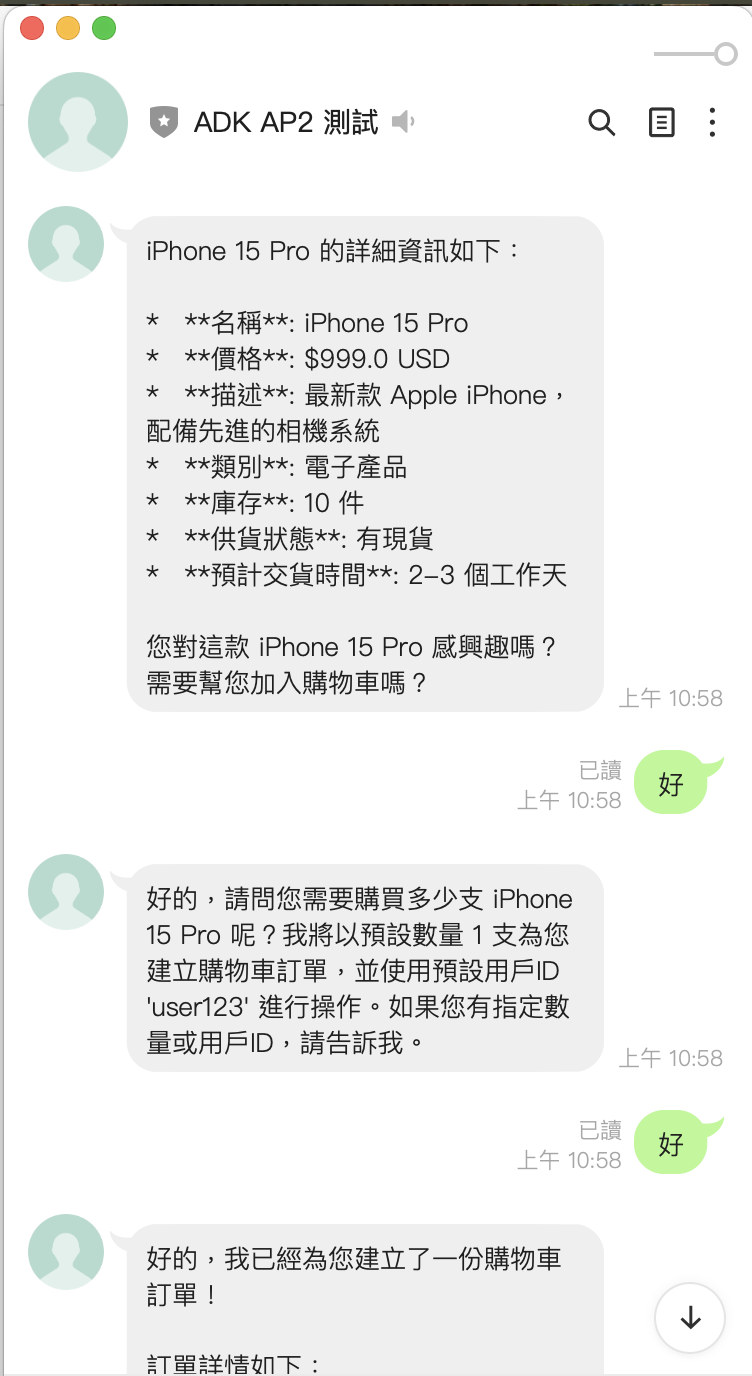
- 這時候,Shopping Agent 會去詢問庫存系統,並且回報產品資訊給你。
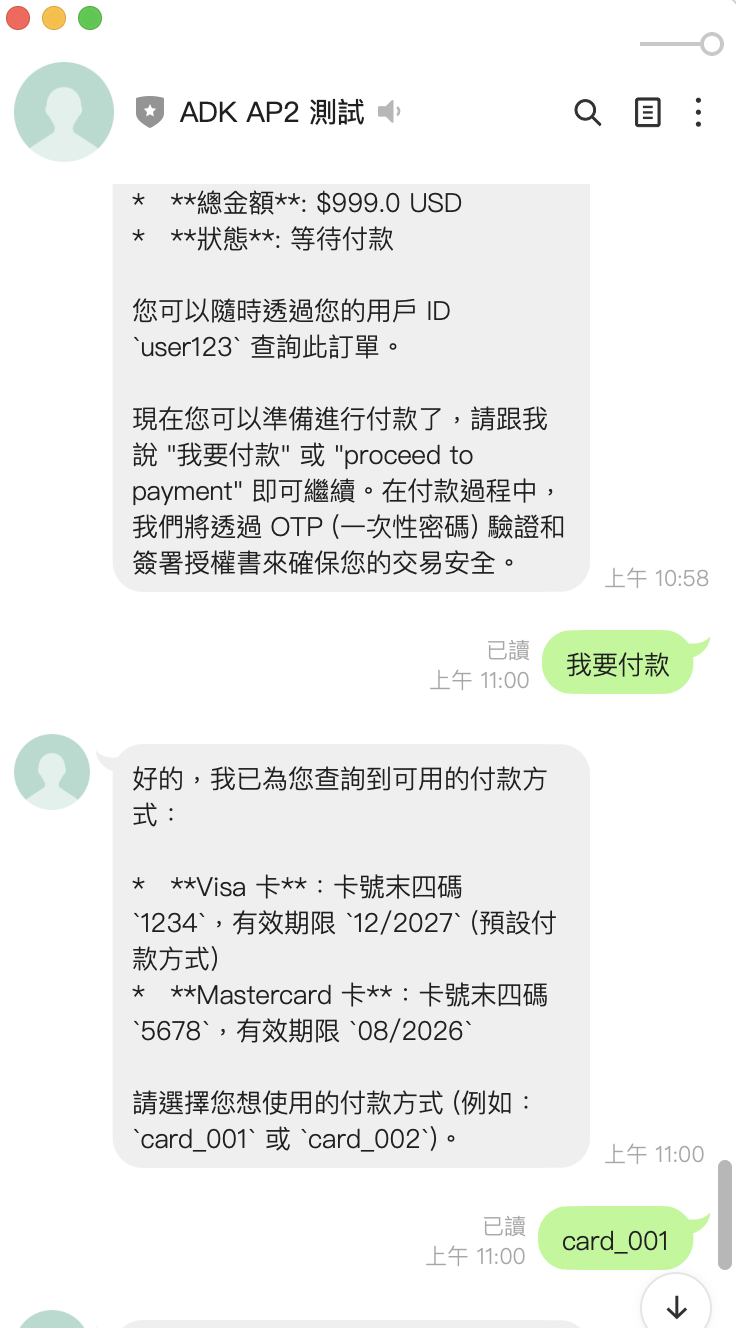
- 當他看到要付款,就會轉給 Payment Agent 來處理付款相關的資訊。
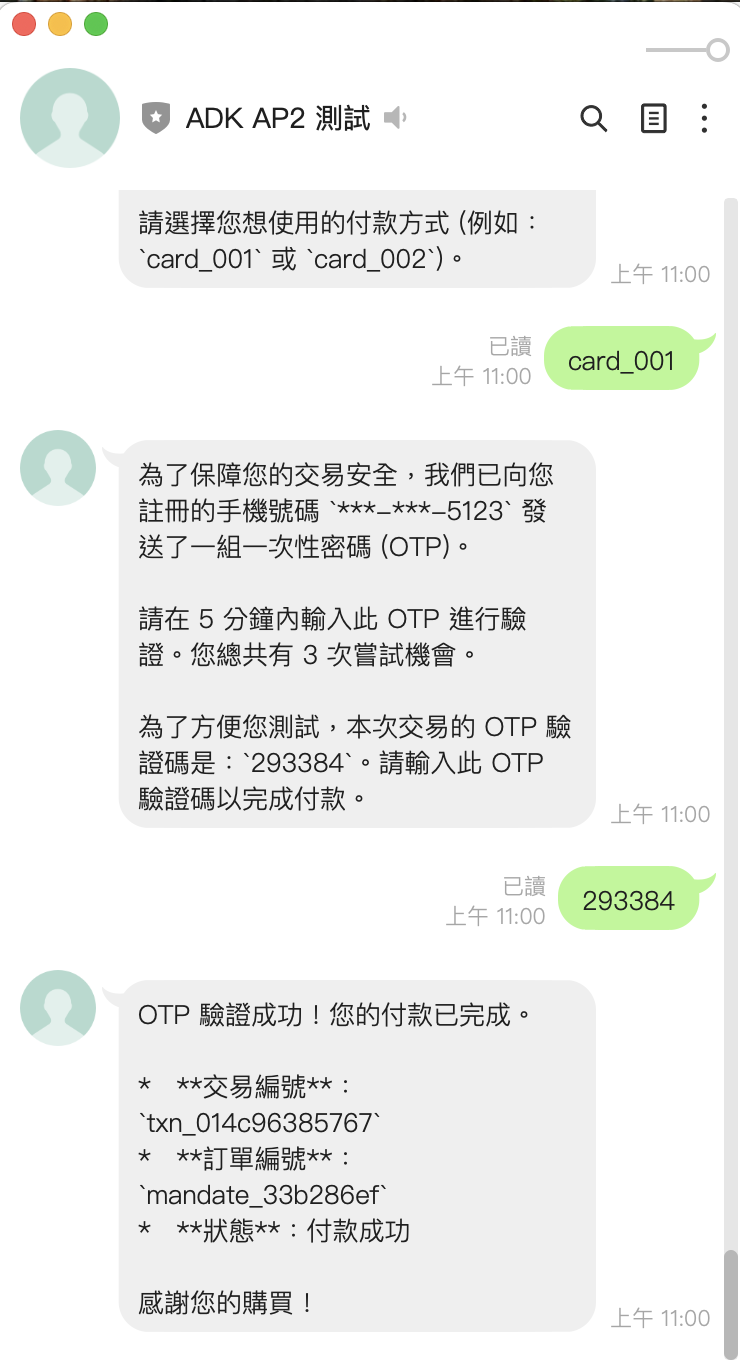
- 這裡也會看到,Payment Agent 有展示了一個付款 OTP 的 Demo (當然是用測試用 OTP )
範例程式碼
https://github.com/kkdai/linebot-ap2
歡迎給 Star 與分享,如果覺得實用也歡迎參與貢獻添加一些新功能。(透過這個程式碼,可以快速部署到 GCP Cloud Run)
關於 AP2 (Agent Payment Protocol) 的架構圖
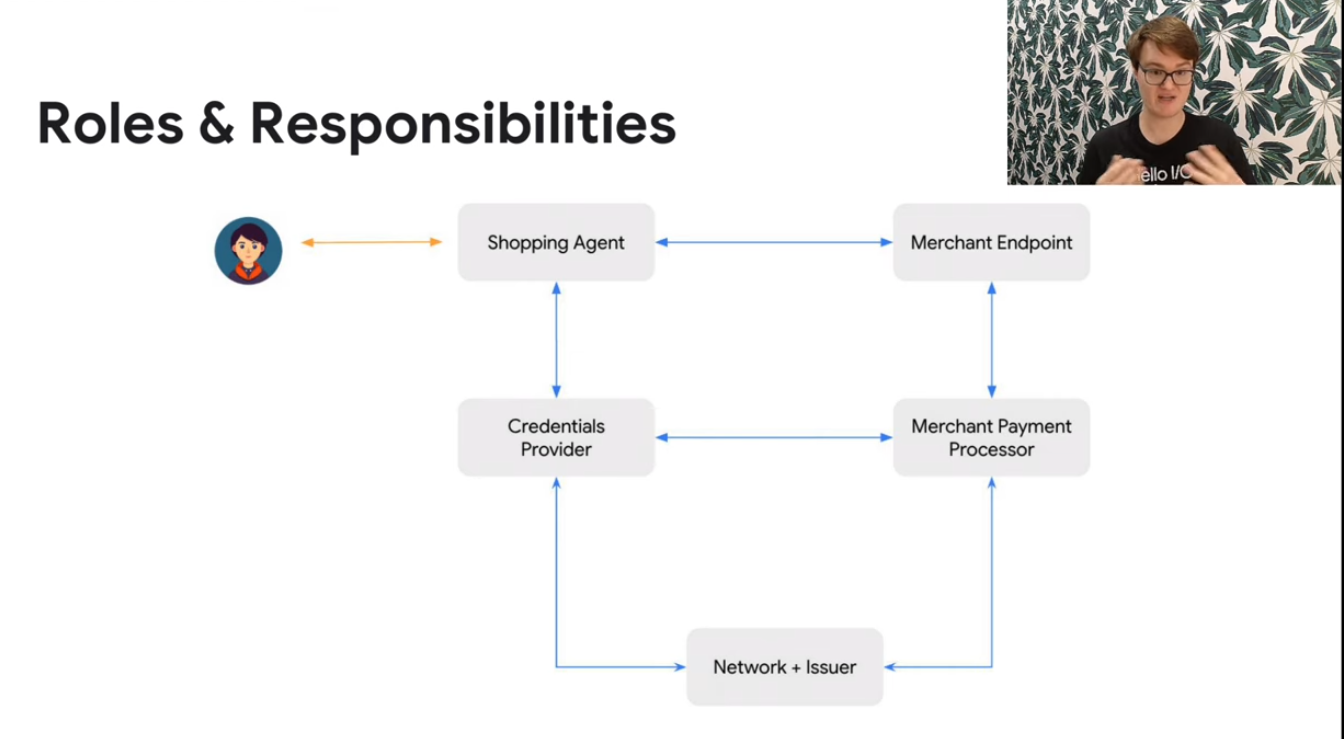
AP2 (Agent Payments Protocol) 是 Google 推出的一套創新的支付協議框架,專門設計來整合 AI Agent 與電商支付流程。跟傳統的電商支付不一樣的地方是,AP2 是專門為了 AI Agent 設計的,讓 AI 可以更自然地處理整個購物到支付的完整流程。
完整的架構介紹,我推薦大家看一下官方的介紹影片
🚀 主要整合進 LINE Bot 的相關部分
這次的升級我把整個專案改造成企業級的架構,主要分成兩個階段來實作:
第一階段:現代化專案結構
- 模組化架構: 採用
src/linebot_ap2/的標準 Python 專案結構 - Pydantic v2: 完整的資料驗證和設定管理
- 現代化配置: 使用
pyproject.toml取代傳統的 setup.py
第二階段:企業級安全與穩定性
- AP2 完全合規: HMAC-SHA256 數位簽章確保交易安全
- Circuit Breaker: 自動故障恢復機制
- 增強型服務: 模組化的服務架構,更容易維護和擴展
AP2 的核心組件
1. Cart Mandate (購物車委託) - 企業級升級版 現在的 Cart Mandate 不只是基本的購物車功能,我們加入了完整的 AP2 合規性和安全機制:
# 新版本:企業級 Cart Mandate 創建
async def enhanced_create_cart_mandate(
    cart_items: List[Dict],
    user_id: str,
    signature_required: bool = True
) -> str:
    """創建具備 AP2 合規性的購物車委託"""

    # 計算總金額並創建 mandate
    mandate_data = {
        "mandate_id": mandate_id,
        "type": "cart_mandate",
        "user_id": user_id,
        "items": validated_items,
        "total_amount": total_amount,
        "currency": "USD",
        "created_at": datetime.now(timezone.utc).isoformat(),
        "expires_at": (datetime.now(timezone.utc) + timedelta(hours=24)).isoformat()
    }

    # 🔐 重點:AP2 合規的數位簽章
    if signature_required:
        mandate_service = MandateService()
        mandate_data["signature"] = mandate_service.sign_mandate(mandate_data)
        mandate_data["signature_algorithm"] = "HMAC-SHA256"

    return json.dumps(mandate_data, ensure_ascii=False, indent=2)
這裡最重要的改進是加入了 HMAC-SHA256 數位簽章,這是 AP2 協議的核心安全要求。
2. 企業級數位簽章服務 這是這次升級最重要的安全功能,符合 AP2 協議的完整要求:
# src/linebot_ap2/services/mandate_service.py
class MandateService:
    """AP2 合規的 Mandate 管理服務"""

    def sign_mandate(self, mandate_data: Dict[str, Any]) -> str:
        """使用 HMAC-SHA256 簽署 mandate"""
        # 準備簽章資料
        signable_data = self._prepare_signable_data(mandate_data)

        # 🔐 HMAC-SHA256 數位簽章
        signature = hmac.new(
            self.secret_key.encode('utf-8'),
            signable_data.encode('utf-8'),
            hashlib.sha256
        ).hexdigest()

        logger.info(f"Mandate signed: {mandate_data.get('mandate_id')}")
        return signature

    def verify_mandate_signature(self, mandate_data: Dict[str, Any], signature: str) -> bool:
        """驗證 mandate 簽章"""
        expected_signature = self.sign_mandate(mandate_data)
        is_valid = hmac.compare_digest(signature, expected_signature)

        if not is_valid:
            logger.warning(f"Invalid signature for mandate: {mandate_data.get('mandate_id')}")

        return is_valid
3. 增強型 OTP 驗證機制 現在的 OTP 系統不只是基本驗證,還加入了企業級的安全機制:
# 新版本:增強型 OTP 驗證
async def enhanced_verify_otp(
    mandate_id: str,
    otp_code: str,
    user_id: str,
    max_attempts: int = 3
) -> str:
    """增強型 OTP 驗證,具備防暴力破解機制"""

    try:
        # 🛡️ 檢查嘗試次數限制
        if otp_data["attempts"] >= max_attempts:
            await cleanup_expired_data()  # 清理過期資料
            return json.dumps({
                "error": "Too many failed attempts",
                "status": "blocked",
                "retry_after": 300  # 5 分鐘後重試
            })

        # ✅ OTP 驗證成功
        if otp_data["otp"] == otp_code:
            # 🔄 Circuit Breaker 保護機制
            with retry_handler.circuit_breaker():
                transaction_id = f"txn_{uuid.uuid4().hex[:12]}"

                # 🔐 完整的交易記錄
                payment_service = PaymentService()
                await payment_service.record_transaction(
                    transaction_id, mandate_id, user_id
                )

        return json.dumps({
            "mandate_id": mandate_id,
            "transaction_id": transaction_id,
            "status": "payment_successful",
            "timestamp": datetime.now(timezone.utc).isoformat()
        })

    except Exception as e:
        logger.error(f"OTP verification failed: {e}")
        # 🔄 自動重試機制
        return await retry_handler.with_retry(
            enhanced_verify_otp, mandate_id, otp_code, user_id
        )
為什麼要使用 AP2 來做電商整合
我之前也有試過很多不同的電商 API 整合方案,但是說實話,大部分都有一些問題。要不就是安全性有疑慮,要不就是整合起來很麻煩。AP2 協議讓我覺得眼睛一亮的地方,主要有以下幾點:
跟 Google ADK 完美整合
如果你之前有玩過 Google ADK (Agent SDK) 的話,就會知道它跟 Gemini 模型的整合非常順暢。AP2 基本上就是為了這個生態系統設計的,所以你可以很輕鬆地:
- 直接使用 Gemini-2.5-flash 模型來處理用戶的購物需求
- 自動化的意圖識別,用戶說「我想買 iPhone」就會自動轉到購物 Agent
- 多語言支援,中英文都沒問題
開發效率真的很高
說實話,如果你要自己從零開始做一套完整的電商支付系統,那真的是會累死。AP2 提供了:
# 基本上概念就是這樣,很簡單(這是簡化示意)
shopping_agent = Agent(
    name="ap2_shopping_assistant",
    model="gemini-2.5-flash",
    tools=[
        search_products,
        get_product_details,
        create_cart_mandate,
        get_shopping_recommendations
    ]
)
注意:上面是概念性的簡化示例。實際專案中我們使用了企業級的 factory pattern 來創建 agents,詳細實作請見下方的「Enhanced Shopping Agent」和「Enhanced Payment Agent」章節。
- 不需要重新造輪子,協議都幫你定義好了
- 標準化的 API 介面,跟不同支付服務商整合都是同一套邏輯
- 內建的安全機制,不用擔心被駭客攻擊
安全性考量很完整
因為涉及到真的要付錢,所以安全性絕對是最重要的。AP2 在這方面做得很不錯:
- OTP 雙重認證,每筆交易都要驗證碼確認
- 數位簽章技術,防止交易被篡改
- 完整的 audit trail,所有交易都有記錄可查
我在測試的時候,還特別試了一下如果 OTP 輸入錯誤會怎樣:
# 最多只能試 3 次,超過就會被鎖定
if otp_data["attempts"] > 3:
    del _otp_store[mandate_id]
    return json.dumps({
        "error": "Too many attempts",
        "status": "blocked"
    })
🏗️ LINE Bot 架構升級實作
這次的升級我完全重新設計了整個系統架構,從原本的三個基本 Agent 升級成企業級的模組化架構。
🛍️ Enhanced Shopping Agent - 企業級購物助手
新的購物 Agent 不只是基本功能,而是具備完整企業級特性:
# src/linebot_ap2/agents/enhanced_shopping_agent.py
def create_enhanced_shopping_agent(model: str = "gemini-2.5-flash") -> Agent:
    """創建增強型購物 Agent,具備企業級功能"""

    return Agent(
        name="enhanced_shopping_agent",
        model=model,
        description="""Advanced shopping assistant with comprehensive product search,
        cart management, and AP2-compliant payment mandate creation.""",

        instruction="""You are an intelligent shopping assistant with advanced capabilities:

        🛍️ **Core Shopping Functions:**
        - **Product Search**: Use enhanced_search_products with filters (category, price range, brand)
        - **Product Details**: Get comprehensive info with enhanced_get_product_details
        - **Recommendations**: Provide personalized suggestions with enhanced_get_recommendations
        - **Cart Management**: Add items and manage shopping carts with enhanced_add_to_cart

        🔐 **AP2 Payment Integration:**
        - **Secure Mandates**: Create signed payment mandates with enhanced_create_cart_mandate
        - **Transaction Security**: All mandates use HMAC-SHA256 signatures for AP2 compliance
        - **Audit Trail**: Full transaction logging and verification""",

        tools=[
            enhanced_search_products,      # 🔍 增強型商品搜尋
            enhanced_get_product_details,  # 📋 詳細商品資訊
            enhanced_create_cart_mandate,  # 🛒 AP2 合規購物車
            enhanced_get_recommendations,  # 🎯 智能推薦
            enhanced_add_to_cart,         # ➕ 購物車管理
            get_product_categories,       # 📂 商品分類
            get_shopping_cart            # 🛍️ 購物車查詢
        ]
    )
💳 Enhanced Payment Agent - 企業級支付處理
新的支付 Agent 具備完整的企業級安全機制和 AP2 合規性:
# src/linebot_ap2/agents/enhanced_payment_agent.py
def create_enhanced_payment_agent(
    model: str = "gemini-2.5-flash",
    max_otp_attempts: int = 3,
    otp_expiry_minutes: int = 5
) -> Agent:
    """創建增強型支付 Agent,具備企業級安全性"""

    return Agent(
        name="enhanced_payment_agent",
        model=model,
        description="""Advanced payment processor with AP2 compliance, enhanced security
        features, and comprehensive error handling.""",

        instruction=f"""You are a secure payment processing agent with advanced capabilities:

        🔐 **Security & Compliance:**
        - **AP2 Protocol**: Full compliance with Agent Payments Protocol standards
        - **OTP Security**: Maximum {max_otp_attempts} attempts, {otp_expiry_minutes}-minute expiry
        - **Encryption**: AES-256 encryption for all payment data
        - **Audit Trail**: Complete transaction logging and monitoring

        💳 **Payment Processing:**
        1. **Payment Methods**: Show available methods with enhanced_get_payment_methods
        2. **Payment Initiation**: Secure processing with enhanced_initiate_payment
        3. **OTP Verification**: Guide users through enhanced_verify_otp process
        4. **Transaction Status**: Real-time updates with enhanced_get_transaction_status
        5. **Refund Processing**: Handle refunds with enhanced_process_refund

        🛡️ **Security Features You Must Explain:**
        - **Mandate Signing**: HMAC-SHA256 signatures ensure transaction integrity
        - **OTP Protection**: Time-limited codes prevent unauthorized access
        - **Fraud Detection**: Real-time monitoring and risk assessment
        - **Data Protection**: PCI DSS Level 1 compliance""",

        tools=[
            enhanced_get_payment_methods,    # 🔍 增強型支付方式
            enhanced_initiate_payment,       # 💰 安全支付發起
            enhanced_verify_otp,            # 🔐 強化 OTP 驗證
            enhanced_get_transaction_status, # 📊 交易狀態追蹤
            enhanced_process_refund,        # 💸 退款處理
            get_mandate_details,           # 📋 Mandate 詳情
            cleanup_expired_data          # 🧹 過期資料清理
        ]
    )
🔄 Circuit Breaker 自動故障恢復機制
這是企業級系統必備的穩定性機制:
# src/linebot_ap2/common/retry_handler.py
class CircuitBreaker:
    """Circuit Breaker 實現自動故障恢復"""

    def __init__(self, failure_threshold: int = 5, timeout: int = 60):
        self.failure_threshold = failure_threshold
        self.timeout = timeout
        self.failure_count = 0
        self.last_failure_time = None
        self.state = "CLOSED"  # CLOSED, OPEN, HALF_OPEN

    def __enter__(self):
        if self.state == "OPEN":
            if time.time() - self.last_failure_time > self.timeout:
                self.state = "HALF_OPEN"
                logger.info("Circuit breaker: HALF_OPEN -> 嘗試恢復")
            else:
                raise CircuitBreakerOpenException("🚫 Circuit breaker is OPEN")
        return self

    def __exit__(self, exc_type, exc_val, exc_tb):
        if exc_type is None:
            # 🟢 成功執行
            if self.state == "HALF_OPEN":
                self.state = "CLOSED"
                self.failure_count = 0
                logger.info("Circuit breaker: HALF_OPEN -> CLOSED (恢復成功)")
        else:
            # 🔴 執行失敗
            self.failure_count += 1
            self.last_failure_time = time.time()

            if self.failure_count >= self.failure_threshold:
                self.state = "OPEN"
                logger.warning(f"Circuit breaker: CLOSED -> OPEN (失敗次數: {self.failure_count})")
支付流程大概是這樣:
- 用戶確認要付款
- 系統產生 OTP 驗證碼
- 用戶輸入驗證碼
- 驗證成功後完成交易
def initiate_payment(mandate_id: str, payment_method_id: str, user_id: str) -> str:
    # 產生 6 位數 OTP
    otp = f"{random.randint(100000, 999999)}"

    # 儲存 OTP (5 分鐘有效期)
    _otp_store[mandate_id] = {
        "otp": otp,
        "user_id": user_id,
        "expires_at": datetime.now() + timedelta(minutes=5),
        "attempts": 0
    }
🤖 智能意圖識別系統
這個是我覺得最有趣的部分,系統會自動判斷用戶想要做什麼:
def determine_intent(message: str) -> str:
    message_lower = message.lower()

    # 購物關鍵字
    shopping_keywords = [
        'buy', 'purchase', 'shop', 'product',
        '買', '購買', '商品', '產品', '購物',
        'iphone', 'macbook', 'airpods'  # 商品名稱
    ]

    # 支付關鍵字
    payment_keywords = [
        'pay', 'payment', 'checkout', 'otp',
        '付款', '支付', '結帳', '驗證'
    ]

    # 檢查關鍵字並回傳對應意圖
    for keyword in payment_keywords:
        if keyword in message_lower:
            return 'payment'

    for keyword in shopping_keywords:
        if keyword in message_lower:
            return 'shopping'

    return 'shopping'  # 預設為購物
📱 LINE Bot 整合的部分
最後是 LINE Bot 的整合,主要在 main.py 裡面:
@app.post("/")
async def handle_callback(request: Request):
    # 處理 LINE webhook
    for event in events:
        if event.message.type == "text":
            msg = event.message.text
            user_id = event.source.user_id

            # 判斷意圖並路由到對應 Agent
            intent = determine_intent(msg)
            response = await call_agent_async(msg, user_id, intent)

            reply_msg = TextSendMessage(text=response)
            await line_bot_api.reply_message(event.reply_token, reply_msg)
每個用戶都會有獨立的 session,所以可以保持對話的上下文:
async def get_or_create_session(user_id):
    if user_id not in active_sessions:
        session_id = f"session_{user_id}"
        await session_service.create_session(
            app_name=APP_NAME, user_id=user_id, session_id=session_id
        )
        active_sessions[user_id] = session_id
    return active_sessions[user_id]
🔍 如何驗證自己是符合 AP2
這一段大概是我寫(Vibe Coding) 完成後,一直無法完全確定是否是正確的部分。以往一直會以為要符合相關的 Protocol ,一定要使用到相關的套件 SDK ,也就是一定要用到 AP2 的套件才算合規。這邊也是完整對過 Spec 跟討論之後的結果。
AP2 不需要特別的 SDK,只要符合協議規範即可:
-
✅ 協議合規 - 你的實作完全符合 AP2 標準
-
✅ 數位簽章合規 - HMAC-SHA256 算法(AP2 標準)
✅ 生命週期管理 - 創建時間、過期時間、狀態追蹤
✅ 安全驗證 - OTP 機制、簽章驗證
✅ 審計軌跡 - 完整的交易記錄和狀態追蹤
✅ 資料完整性 - 必要欄位驗證、格式標準化
✅ 狀態管理 - 符合 AP2 的狀態流轉規則
-
-
✅ 資料格式正確 - Cart/Payment Mandate 格式符合規範
這邊列出相關程式碼:
def create_cart_mandate(product_id: str, quantity: int = 1, user_id: str = "") -> str:
  cart_mandate = {
     "mandate_id": mandate_id,           # ✅ AP2 必要欄位
      "type": "cart_mandate",             # ✅ AP2 協議類型
     "user_id": user_id,                 # ✅ 用戶識別
      "items": [{                         # ✅ 商品清單
          "product_id": product_id,
          "name": product["name"],
          "price": product["price"],
          "quantity": quantity,
          "subtotal": total_amount
      }],
      "total_amount": total_amount,       # ✅ 總金額
      "currency": product["currency"],    # ✅ 貨幣類型
      "created_at": datetime.now().isoformat(),  # ✅ 建立時間
      "status": "pending_payment"         # ✅ 狀態
  }
關於 CartMadate 的資料結構:
# 創建結構化資料 mandate = CartMandate( mandate_id=mandate_id, # ✅ 唯一識別碼 user_id=user_id, # ✅ 用戶ID items=cart_items, # ✅ 商品清單 (CartItem 物件) total_amount=total_amount, # ✅ 總金額 currency=currency, # ✅ 貨幣 created_at=datetime.now(), # ✅ 建立時間 expires_at=datetime.now() + timedelta(...), # ✅ 過期時間 status=PaymentStatus.PENDING # ✅ 狀態 ) class CartMandate(BaseModel): mandate_id: str # ✅ 必要:mandate 識別碼 type: str = "cart_mandate" # ✅ 必要:AP2 類型標識 user_id: str # ✅ 必要:用戶識別 items: List[CartItem] # ✅ 必要:商品清單 total_amount: float # ✅ 必要:總金額 currency: str = "USD" # ✅ 必要:貨幣類型 created_at: datetime # ✅ 必要:建立時間 status: PaymentStatus # ✅ 必要:處理狀態 expires_at: Optional[datetime] # ✅ 可選:過期時間 -
✅ 安全機制完整 - HMAC-SHA256 簽章、OTP 驗證 附上相關程式碼
payload = { "mandate_id": mandate.mandate_id, # ✅ 簽章內容 "user_id": mandate.user_id, "total_amount": mandate.total_amount, "currency": mandate.currency, "items_count": len(mandate.items), "timestamp": timestamp, "nonce": nonce } # ✅ HMAC-SHA256 簽章 (AP2 標準) signature = hmac.new( self.secret_key.encode('utf-8'), payload_string.encode('utf-8'), hashlib.sha256 ).hexdigest() -
✅ 工作流程正確 - 購物→支付→驗證的完整流程
🔧 企業級升級踩坑經驗分享
1. Pydantic v2 升級挑戰
升級到企業級架構時遇到的第一個問題是 Pydantic v2 的導入變更:
# ❌ 舊版本 (Pydantic v1)
from pydantic import BaseSettings

# ✅ 新版本 (Pydantic v2)
from pydantic_settings import BaseSettings

# 解決方案:更新 pyproject.toml
dependencies = [
    "pydantic>=2.5.0",
    "pydantic-settings>=2.1.0",  # 新增這個套件
]
2. Enhanced Session 管理升級
原本的 session 管理太簡單,企業級版本加入了完整的監控和清理機制:
# src/linebot_ap2/common/session_manager.py
class EnhancedSessionManager:
    """企業級 Session 管理,具備清理和監控功能"""

    async def get_or_create_session(self, user_id: str) -> str:
        """取得或創建用戶 session,具備自動清理機制"""

        if user_id not in self.active_sessions:
            session_id = f"session_{user_id}_{int(time.time())}"

            # 🧹 清理過期 session
            await self.cleanup_expired_sessions()

            # 📊 記錄 session 創建
            logger.info(f"Creating new session for user: {user_id}")

            await self.session_service.create_session(
                app_name=self.app_name,
                user_id=user_id,
                session_id=session_id
            )

            self.active_sessions[user_id] = {
                "session_id": session_id,
                "created_at": datetime.now(timezone.utc),
                "last_activity": datetime.now(timezone.utc)
            }

        # 更新最後活動時間
        self.active_sessions[user_id]["last_activity"] = datetime.now(timezone.utc)
        return self.active_sessions[user_id]["session_id"]
3. Circuit Breaker 整合挑戰
實作 Circuit Breaker 時發現 decorator 模式太複雜,簡化為 context manager:
# ❌ 原本想用複雜的 decorator
@retry_handler.with_circuit_breaker()
async def some_function():
    pass

# ✅ 改用簡單的 context manager
async def enhanced_verify_otp(...):
    try:
        with retry_handler.circuit_breaker():
            # 執行 OTP 驗證邏輯
            result = await process_otp_verification(...)
            return result
    except CircuitBreakerOpenException:
        return json.dumps({
            "error": "Service temporarily unavailable",
            "status": "circuit_breaker_open",
            "retry_after": 60
        })
4. AP2 HMAC 簽章的正確實作
一開始對 AP2 的數位簽章規範理解不夠深入,後來研究官方文件才知道:
def _prepare_signable_data(self, mandate_data: Dict[str, Any]) -> str:
    """準備用於簽章的資料,必須按照 AP2 規範排序"""

    # 🔐 重要:必須按照特定順序排列欄位
    signable_fields = [
        "mandate_id", "type", "user_id", "total_amount",
        "currency", "created_at", "expires_at"
    ]

    # 過濾並排序欄位
    filtered_data = {
        key: mandate_data[key]
        for key in signable_fields
        if key in mandate_data
    }

    # 產生可簽章的字串
    return "|".join([f"{k}={v}" for k, v in sorted(filtered_data.items())])
🚀 結語與未來方向
整合完才會知道,其實 VP2 並不是一整套的 SDK 或是框架,而是一個協定與相關規範。讓每一個組織都能夠打造出自己的 Payment Protocol 而不需要依賴其他人。
以下是未來的一些方向
進階 AI 功能
- 多模態搜尋: 圖片、語音、文字混合搜尋
- 個人化推薦: 基於用戶行為的 ML 推薦引擎
- 對話式客服: 整合 Gemini Pro 處理複雜查詢
希望這篇文章能幫助大家了解 AP2 協議的實作方式。如果你對程式碼有任何問題,歡迎到 GitHub 專案 留言討論,也歡迎大家 fork 回去改進!
記得如果覺得有用的話,給個 ⭐ Star 支持一下 :)

