
前情提要
身為一個資訊焦慮的工程師,我每天都會追蹤多個技術部落格和 Hacker News。但手動瀏覽實在太花時間,於是我決定用 n8n 打造一個自動化系統:RSS 更新時自動抓取網頁內容、用 Gemini AI 產生摘要、存入 Google Sheets,然後每天早上 6 點推送精選文章到 LINE。
這個專案整合了多個服務:
- 📡 RSS Feed:訂閱多個資訊來源
- 🕷️ Firecrawl:抓取網頁完整內容
- 🤖 Gemini 2.5 Flash:AI 自動摘要
- 📊 Google Sheets:儲存文章資料
- 📱 LINE Messaging API:Flex Message 推送通知
聽起來很美好,但實作過程中踩了不少坑,這篇文章記錄我遇到的問題和解決方案。
系統架構
整個系統分成兩個獨立的 n8n Workflow:
Workflow 1:RSS 即時處理
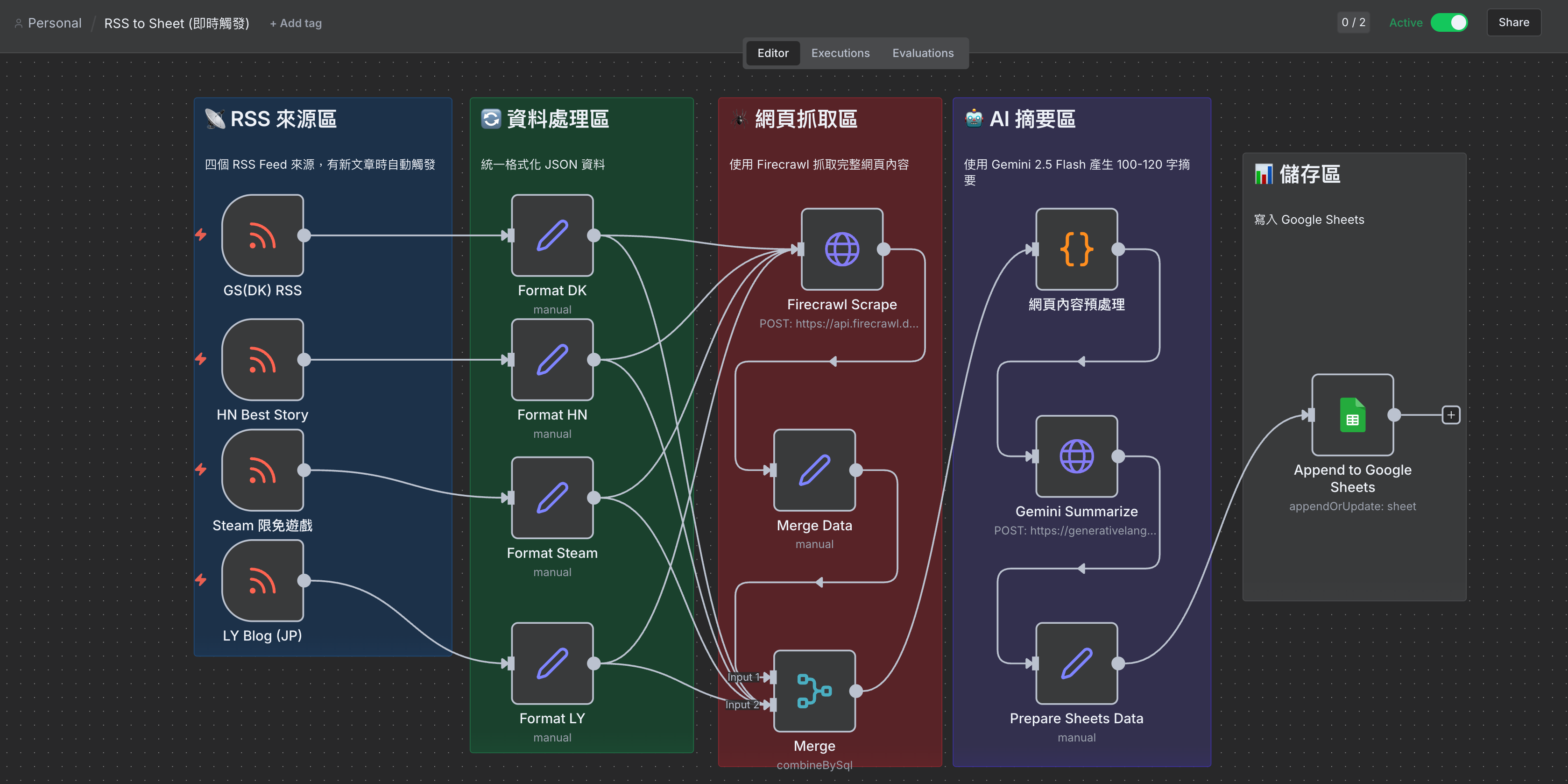
RSS 觸發 → 格式化資料 → Firecrawl 抓取網頁 → 內容預處理 → Gemini 摘要 → 寫入 Google Sheets
Workflow 2:每日定時發送
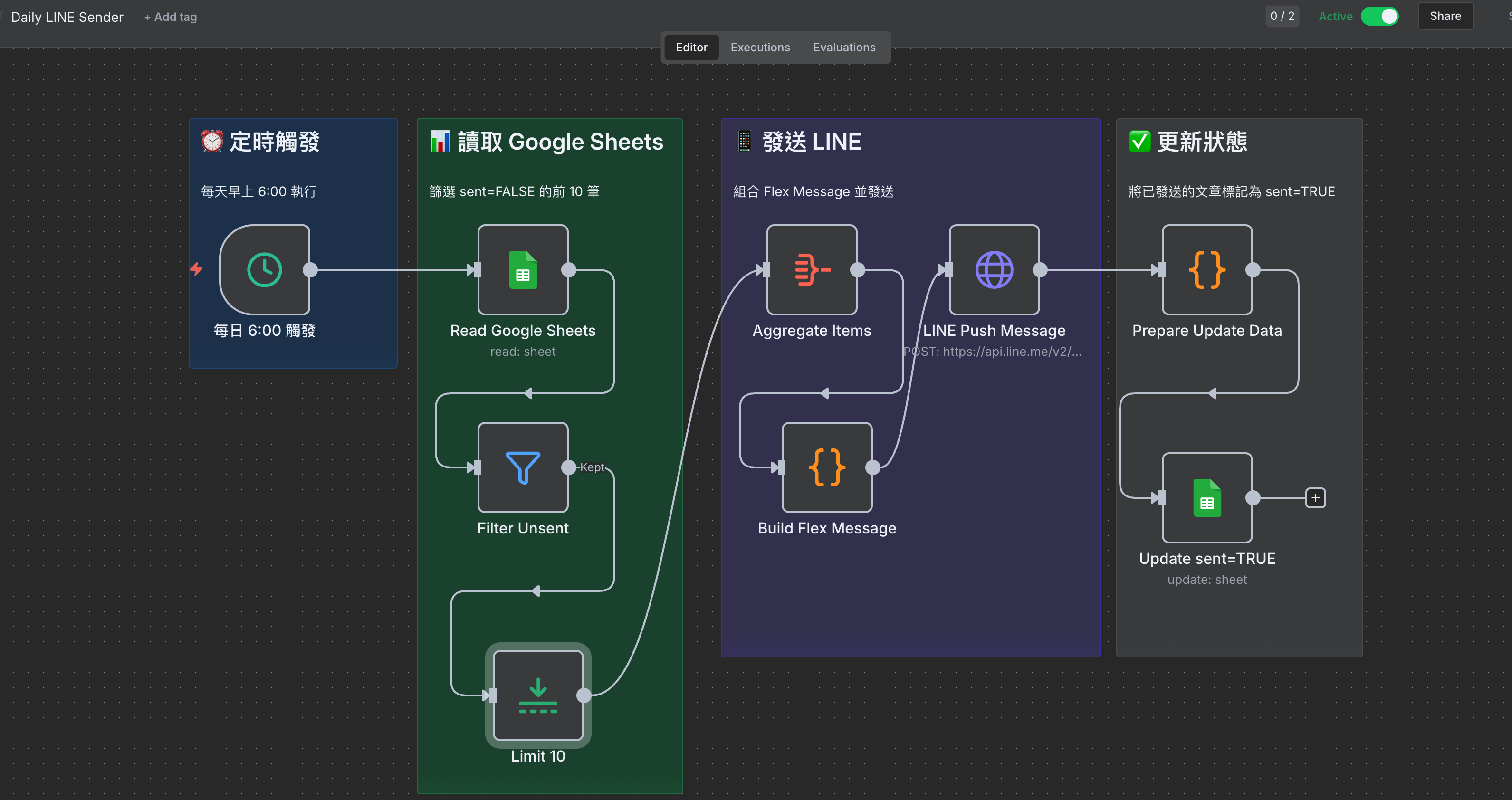
每日 6:00 觸發 → 讀取 Google Sheets → 篩選未發送 → 取 10 筆 → 組合 Flex Message → LINE 推送 → 更新狀態
開發過程中遇到的問題
問題 1:n8n Code Node 語法錯誤
我一開始在 Code Node 使用 ES Module 語法:
// ❌ 錯誤的做法
export default async function () {
  const items = this.getInputData();
  // ...
}
結果 n8n 一直報錯,執行失敗。
解決方案: 改用 n8n 標準的寫法,直接使用 $input.all():
// ✅ 正確的做法
const items = $input.all();

const newItems = items.map(item => {
  // 處理邏輯
  return {
    json: {
      ...item.json,
      // 新增欄位
    }
  };
});

return newItems;
問題 2:Gemini API 回傳 MAX_TOKENS 錯誤
送出請求後,Gemini 回傳了這個結果:
{
  "candidates": [
    {
      "content": { "role": "model" },
      "finishReason": "MAX_TOKENS",
      "index": 0
    }
  ],
  "usageMetadata": {
    "promptTokenCount": 568,
    "totalTokenCount": 867,
    "thoughtsTokenCount": 299
  }
}
一開始我以為是輸入太長,但仔細看 promptTokenCount 只有 568,問題出在 輸出 token 限制!
原來 Gemini 2.5 Flash 有 Thinking 功能,會消耗一部分 output token 做內部思考。我設定 maxOutputTokens: 300,但 thinking 就用掉了 299,實際輸出只剩 1 個 token!
解決方案: 提高 maxOutputTokens 或關閉 Thinking 功能:
// 方案 1:提高 output token 限制
{
  "generationConfig": {
    "temperature": 0.7,
    "maxOutputTokens": 1024  // 從 300 提高到 1024
  }
}

// 方案 2:關閉 Thinking 功能
{
  "generationConfig": {
    "temperature": 0.7,
    "maxOutputTokens": 512,
    "thinkingConfig": {
      "thinkingBudget": 0  // 關閉 thinking
    }
  }
}
問題 3:Firecrawl 抓取的內容太雜
Firecrawl 會抓取整個網頁,包含導覽列、側欄、留言區等雜訊。直接送給 Gemini 會浪費 token,也影響摘要品質。
解決方案: 在送給 Gemini 之前,先用 Code Node 清理內容:
const items = $input.all();
const maxLen = 1500;  // 限制最大字數

const newItems = items.map(item => {
  const title = item.json.title || '';
  const raw = item.json.content || '';

  // 1. 移除雜訊
  let text = raw
    .replace(/```[\s\S]*?```/g, '')              // 移除程式碼區塊
    .replace(/`[^`]+`/g, '')                     // 移除行內程式碼
    .replace(/!\[[^\]]*\]\([^)]*\)/g, '')        // 移除 markdown 圖片
    .replace(/<[^>]+>/g, '')                     // 移除 HTML 標籤
    .replace(/https?:\/\/\S+/g, '')              // 移除 URL
    .replace(/\[([^\]]+)\]\([^)]+\)/g, '$1')     // 保留連結文字
    .replace(/[#>*`|_~]/g, '')                   // 移除 markdown 符號
    .replace(/\n{3,}/g, '\n\n')                  // 壓縮換行
    .replace(/\s{2,}/g, ' ')                     // 壓縮空白
    .trim();

  // 2. 切掉無關內容
  const cutPatterns = [
    'Leave a Reply', 'Recent Comments', 'Related Posts',
    'Share this', 'Subscribe', 'Newsletter', 'Copyright',
    '關於作者', '延伸閱讀', '相關文章', '留言'
  ];

  for (const pattern of cutPatterns) {
    const idx = text.indexOf(pattern);
    if (idx > 200) {
      text = text.slice(0, idx);
    }
  }

  // 3. 限制長度,保留完整句子
  text = text.slice(0, maxLen);
  if (text.length === maxLen) {
    const lastPeriod = Math.max(
      text.lastIndexOf('。'),
      text.lastIndexOf('!'),
      text.lastIndexOf('?'),
      text.lastIndexOf('. ')
    );
    if (lastPeriod > maxLen * 0.5) {
      text = text.slice(0, lastPeriod + 1);
    }
  }

  // 4. 組成精簡的 prompt
  const prompt = `用繁體中文寫100字以內摘要,只輸出摘要正文:

標題:${title}

內容:
${text}`;

  return {
    json: {
      ...item.json,
      prompt: prompt
    }
  };
});

return newItems;
問題 4:LINE Flex Message 報錯 “message is invalid”
LINE Push Message 回傳錯誤:
A message (messages[0]) in the request body is invalid
檢查 Flex Message JSON 後發現,有些文章的 title 欄位是空的,導致 "text": undefined。LINE API 不接受空的 text 欄位。
問題根源: Google Sheets 讀出來的欄位名稱不是 title,而是 col_1(因為標題列設定問題)。
解決方案: 在 Build Flex Message 時加上 fallback:
const items = $input.first().json.data || [];

const bubbles = items.map((item) => {
  // 修正:檢查多個可能的欄位名稱,並提供預設值
  const title = item.title || item.col_1 || item.link || '無標題';
  const summary = item.summary || '無摘要內容';
  const link = item.link || 'https://example.com';
  const source = item.source || 'Unknown';

  return {
    "type": "bubble",
    "size": "kilo",
    "body": {
      "type": "box",
      "layout": "vertical",
      "contents": [
        {
          "type": "text",
          "text": title,  // 確保永遠有值
          "weight": "bold",
          "wrap": true
        },
        {
          "type": "text",
          "text": summary,  // 確保永遠有值
          "size": "sm",
          "wrap": true
        }
      ]
    },
    // ...
  };
});
API Credential 設定
Firecrawl API Key
n8n 中選擇 Header Auth:
| 欄位 | 值 |
|---|---|
| Name | Authorization |
| Value | Bearer fc-your-api-key |
Gemini API Key
n8n 中選擇 Header Auth:
| 欄位 | 值 |
|---|---|
| Name | x-goog-api-key |
| Value | your-gemini-api-key |
⚠️ 注意: Gemini 用的是 x-goog-api-key header,不是 Bearer token!
LINE Channel Access Token
n8n 中選擇 Header Auth:
| 欄位 | 值 |
|---|---|
| Name | Authorization |
| Value | Bearer your-channel-access-token |
Google Sheets 欄位設計
| title | link | summary | source | created_at | sent |
|---|---|---|---|---|---|
| 文章標題 | 網址 | AI 摘要 | 來源 | 發布時間 | FALSE |
⚠️ 重要: 確保第一行的標題列正確設定,否則 n8n 讀出來的 key 會變成 col_1, col_2 這種格式!
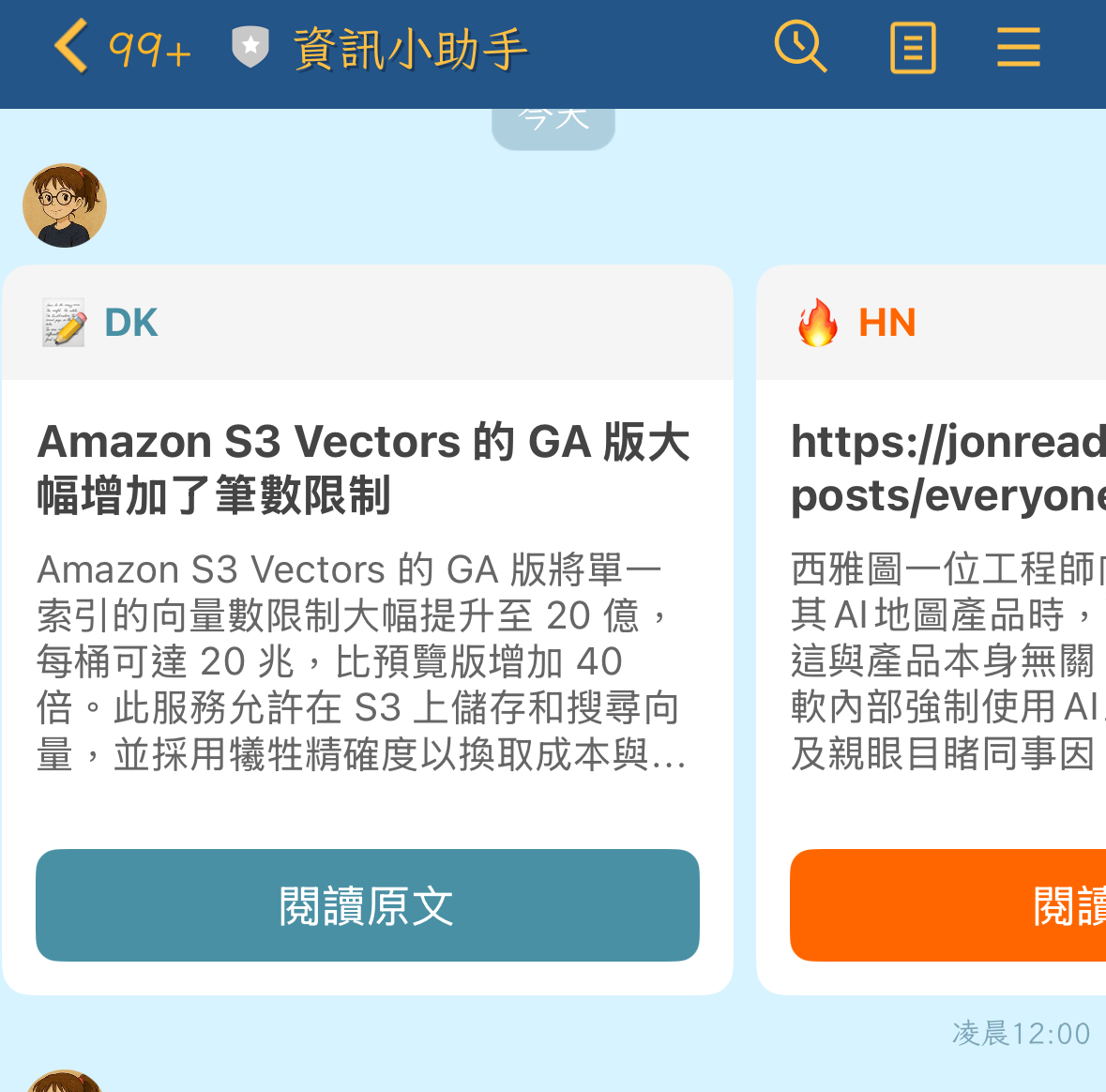
LINE Flex Message 效果
最終的 Flex Message 是 Carousel 格式,每篇文章一張卡片:
┌─────────────────────────┐
│ 📝 DK                   │  ← 來源標籤 + emoji
├─────────────────────────┤
│ 文章標題                  │  ← 粗體標題
│                         │
│ 摘要內容摘要內容摘要       │  ← 100 字摘要
│ 內容摘要內容...           │
├─────────────────────────┤
│    [閱讀原文]            │  ← 按鈕連結
└─────────────────────────┘
不同來源有不同的顏色和 emoji:
- 📝 DK (藍色 #4A90A4)
- 🔥 HN (橘色 #FF6600)
- 🎮 Steam (深藍 #1B2838)
- 🇯🇵 LY Blog (綠色 #00C300)
踩坑總結
| 問題 | 原因 | 解決方案 |
|---|---|---|
| Code Node 執行失敗 | ES Module 語法不相容 | 使用 $input.all() 標準寫法 |
| Gemini MAX_TOKENS | Thinking 功能消耗 output token | 提高 maxOutputTokens 到 1024 |
| 摘要品質差 | 網頁雜訊太多 | 預處理移除無關內容 |
| LINE message invalid | Flex Message 有空值 | 加上 fallback 預設值 |
| Google Sheets 欄位名稱錯誤 | 標題列未正確設定 | 確保第一行有正確的欄位名稱 |
開發心得
這次專案讓我學到幾個重要的經驗:
-
Gemini 2.5 的 Thinking 功能會消耗 output token:如果你的輸出被截斷,先檢查
thoughtsTokenCount,可能需要提高maxOutputTokens或關閉 thinking。 -
n8n Code Node 要用標準寫法:避免使用
export default或this.getInputData(),直接用$input.all()最穩定。 -
永遠要處理空值:API 回傳的資料可能缺少欄位,在組合輸出時一定要加上 fallback。
-
預處理很重要:送給 AI 的內容越乾淨,摘要品質越好,也越省 token。
-
Google Sheets 的欄位名稱取決於標題列:如果讀出來的 key 是
col_1,代表標題列有問題。
這個系統現在每天早上 6 點會自動推送 10 篇精選文章到我的 LINE,終於可以在通勤時快速掌握技術動態了!🎉
參考資料

