
前情提要
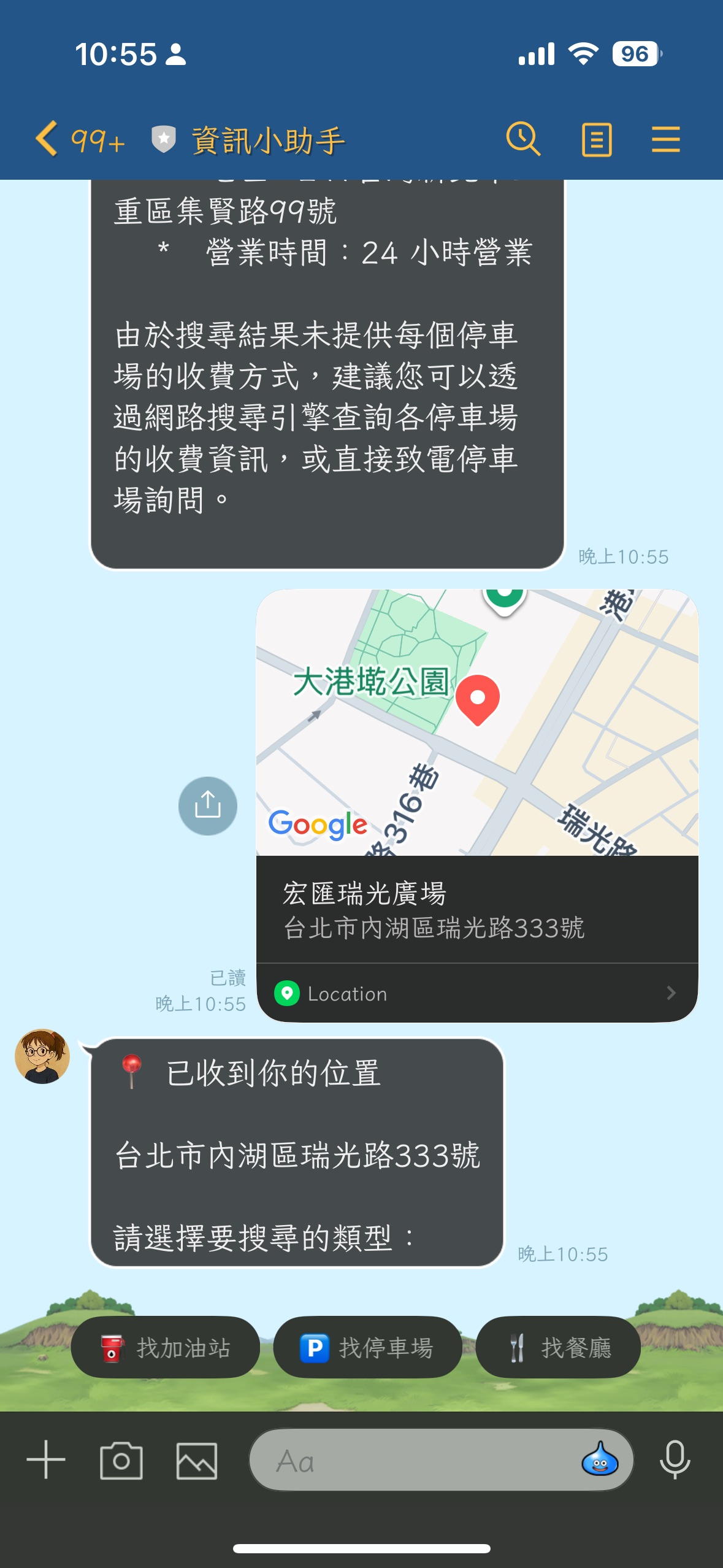
在開發 LINE Bot 時,我想加入一個功能:讓使用者分享位置後,AI 可以智慧推薦附近的餐廳、加油站或停車場。傳統做法需要串接 Google Places API,處理複雜的搜尋邏輯和結果排序。但 Google 在 2024 年推出了 Grounding with Google Maps 功能,可以讓 Gemini 模型直接存取 Google Maps 的 2.5 億個地點資訊,讓 AI 回應自動帶有地理位置脈絡!
這項功能透過 Vertex AI 提供,可以讓 Gemini 模型「接地氣」(grounded)地回答位置相關問題,不再只是憑空想像。
開發過程中遇到的問題
在實作 maps_grounding.py 時,我最初使用 Gemini Developer API 搭配 API Key 的方式:
# ❌ 錯誤的做法
client = genai.Client(
    api_key=api_key,
    http_options=HttpOptions(api_version="v1")
)

response = client.models.generate_content(
    model="gemini-2.0-flash-lite",  # 不支援 Maps Grounding
    contents=query,
    config=GenerateContentConfig(
        tools=[Tool(google_maps=GoogleMaps())],
        tool_config=ToolConfig(...)
    ),
)
結果出現了這個錯誤:
google.genai.errors.ClientError: 400 INVALID_ARGUMENT.
{'error': {'code': 400, 'message': 'Invalid JSON payload received.
Unknown name "tools": Cannot find field.
Invalid JSON payload received. Unknown name "toolConfig": Cannot find field.'}}
經過查閱文件後才發現,Google Maps Grounding 只支援 Vertex AI,無法使用 Gemini Developer API!
正確的解決方案
1. 理解 API 差異
Google 提供兩種不同的 Gemini API 存取方式:
| 特性 | Gemini Developer API | Vertex AI API |
|---|---|---|
| 認證方式 | API Key | ADC / Service Account |
| Maps Grounding | ❌ 不支援 | ✅ 支援 |
| 企業級功能 | 有限 | 完整 |
| 適用場景 | 快速原型開發 | 生產環境 |
2. 修正程式碼
以下是正確的實作方式:
from google import genai
from google.genai import types

# ✅ 正確的做法:使用 Vertex AI
client = genai.Client(
    vertexai=True,  # 啟用 Vertex AI 模式
    project=project_id,  # GCP 專案 ID
    location=location,  # 建議使用 'global'
    http_options=types.HttpOptions(api_version="v1")
)

# 使用支援 Maps Grounding 的模型
response = client.models.generate_content(
    model="gemini-2.0-flash",  # ✅ 支援的模型
    contents=query,
    config=types.GenerateContentConfig(
        tools=[
            types.Tool(google_maps=types.GoogleMaps(
                enable_widget=False
            ))
        ],
        tool_config=types.ToolConfig(
            retrieval_config=types.RetrievalConfig(
                lat_lng=types.LatLng(
                    latitude=latitude,
                    longitude=longitude
                ),
                language_code="zh-TW",  # 支援繁體中文
            ),
        ),
    ),
)
3. 環境設定
要使用 Maps Grounding,需要設定以下環境變數:
# 必要的環境變數
export GOOGLE_CLOUD_PROJECT="your-project-id"
export GOOGLE_CLOUD_LOCATION="global"
export GOOGLE_GENAI_USE_VERTEXAI="True"

# 認證方式(擇一)
# 方式 1: 使用 ADC (開發環境)
gcloud auth application-default login

# 方式 2: 使用 Service Account (生產環境)
export GOOGLE_APPLICATION_CREDENTIALS="/path/to/service-account-key.json"

# 啟用 Vertex AI API
gcloud services enable aiplatform.googleapis.com
實際應用範例
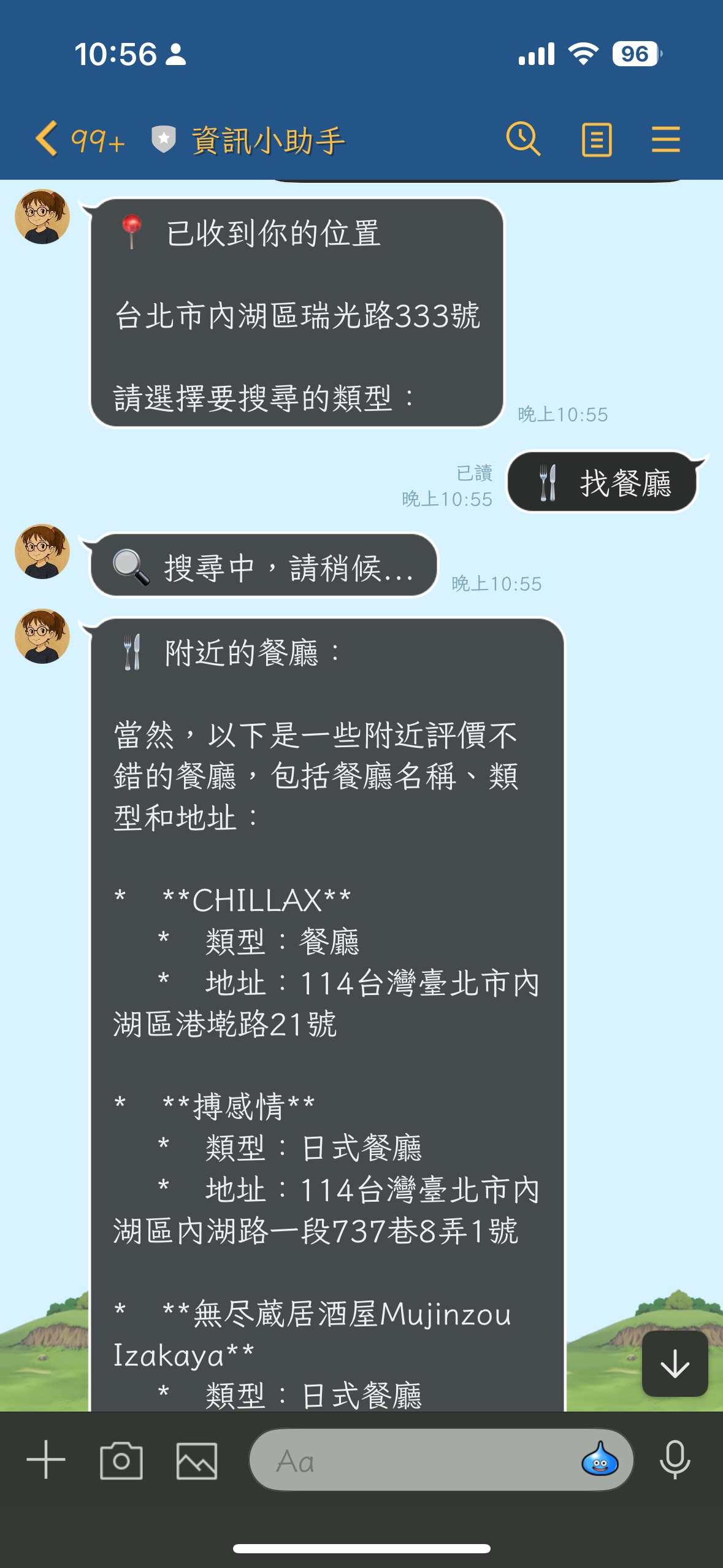
實作後的功能非常強大,可以用自然語言查詢附近地點:
async def search_nearby_places(
    latitude: float,
    longitude: float,
    place_type: str = "restaurant",
    custom_query: Optional[str] = None,
    language_code: str = "zh-TW"
) -> str:
    """
    使用 Google Maps Grounding API 搜尋附近地點

    範例查詢:
    - "請幫我找出附近的加油站,並列出名稱、距離和地址。"
    - "請幫我找出附近評價不錯的餐廳,並列出名稱、類型和地址。"
    """
使用情境
- 對話式助理:「幫我找附近好喝的義式濃縮咖啡店」
- 個人化推薦:「有哪些適合親子、步行可達的餐廳?」
- 地區總結:「這個飯店附近有什麼特色?」
這些應用場景特別適合:
- 🏠 房地產平台
- ✈️ 旅遊規劃
- 🚗 移動出行
- 📱 社交媒體
支援的模型清單
目前支援 Google Maps Grounding 的 Gemini 模型:
- ✅ Gemini 3.1 Pro / Flash-Lite (預覽版)
- ✅ Gemini 2.5 Pro / Flash
- ✅ Gemini 2.0 Flash
- ✅ Gemini 2.5 Flash with Live API
- ❌ Gemini 1.5 Flash-Lite (不支援)
注意:最新的 Gemini 3.1 Flash-Lite 已經開始支援地圖基準功能,這對於降低延遲非常有幫助!
Google Maps Platform Code Assist (MCP)

在開發過程中,我也發現 Google 推出了 Google Maps Platform Code Assist toolkit,這是一個基於 Model Context Protocol (MCP) 的工具,可以:
- 🔍 即時文件檢索:透過 RAG 技術搜尋最新的官方文件、程式碼範例、教學與安全資源。
- 🤖 AI 助手整合:支援 Gemini CLI、Claude Code、Cursor 等多種開發環境。
- 📚 核心工具:
retrieve-google-maps-platform-docs:接收自然語言查詢並檢索地圖官方文件。retrieve-instructions:必須優先呼叫,提供系統指令協助 AI 了解如何正確使用工具。
如何使用 MCP
目前 Google Maps Platform Code Assist 提供遠端的 MCP 伺服器,安裝方式如下:
Gemini CLI
在 Gemini CLI 中執行以下指令即可完成安裝:
gemini mcp add -s user -t http maps-code-assist-mcp https://mapscodeassist.googleapis.com/mcp
安裝完成後,可以使用 /mcp list 檢查是否出現 maps-code-assist-mcp - Ready (2 tools)。
Claude Code / Cursor
如果是使用 Claude Code,建議使用 npx 啟動:
claude mcp add google-maps-platform-code-assist -- npx -y @googlemaps/code-assist-mcp@latest
或者直接將遠端伺服器端點 https://mapscodeassist.googleapis.com/mcp 加入到設定檔中。
網頁嵌入地圖範例 (JavaScript Web Components)
除了後端的 Grounding,如果你想在網頁中直接嵌入一個以台北 101 為中心的地圖,現在最推薦的方式是使用 Web Components。這可以大幅簡化程式碼:
<!DOCTYPE html>
<html>
  <head>
    <title>台北 101 地圖範例</title>
    <style>
      gmp-map { height: 500px; width: 100%; }
    </style>
    <!-- 載入 Maps JS API -->
    <script>
      (g=>{var h,a,k,p="The Google Maps JavaScript API",c="google",l="importLibrary",q="__ib__",m=document,b=window;b=b[c]||(b[c]={});var d=b.maps||(b.maps={}),r=new Set,e=new URLSearchParams,u=()=>h||(h=new Promise(async(f,n)=>{await (a=m.createElement("script"));e.set("libraries",[...r]+"");for(k in g)e.set(k.replace(/[A-Z]/g,t=>"_"+t[0].toLowerCase()),g[k]);e.set("callback",c+".maps."+q);a.src=`https://maps.${c}apis.com/maps/api/js?`+e;d[q]=f;a.onerror=()=>h=n(Error(p+" could not load."));a.nonce=m.querySelector("script[nonce]")?.nonce||"";m.head.append(a)}));d[l]?console.warn(p+" only loads once. Ignoring:",g):d[l]=(f,...n)=>r.add(f)&&u().then(()=>d[l](f,...n))})({
        key: "YOUR_API_KEY",
        v: "weekly"
      });
    </script>
  </head>
  <body>
    <gmp-map
      center="25.0339639,121.5644681"
      zoom="15"
      map-id="DEMO_MAP_ID">
      <gmp-advanced-marker
        position="25.0339639,121.5644681"
        title="台北 101">
      </gmp-advanced-marker>
    </gmp-map>
  </body>
</html>
目前需要注意的地方
1. 必須使用 Vertex AI
Maps Grounding 功能不支援一般的 Gemini Developer API,必須透過 Vertex AI 存取。
2. 認證設定
- 開發環境:使用
gcloud auth application-default login - 生產環境:使用 Service Account 並設定
GOOGLE_APPLICATION_CREDENTIALS
3. 區域選擇
建議將 GOOGLE_CLOUD_LOCATION 設為 global 以獲得最佳可用性。
4. 成本考量
Vertex AI 的計費方式與 Developer API 不同,建議先在定價頁面了解費用結構。目前 Google Maps Grounding 在免費方案下每天提供最多 500 次要求。
開發心得
這次從錯誤中學到的最大收穫是:並非所有 Gemini 功能都能透過 Developer API 存取。企業級功能如 Maps Grounding、進階安全過濾器等,都需要透過 Vertex AI。
雖然設定 Vertex AI 比單純使用 API Key 複雜一些,但換來的是:
- ✅ 更強大的功能(Maps Grounding、Search Grounding)
- ✅ 更完整的企業級支援
- ✅ 更靈活的部署選項
- ✅ 更細緻的存取控制
如果你正在開發需要位置感知的 AI 應用,Google Maps Grounding 絕對值得一試!
參考資料

