
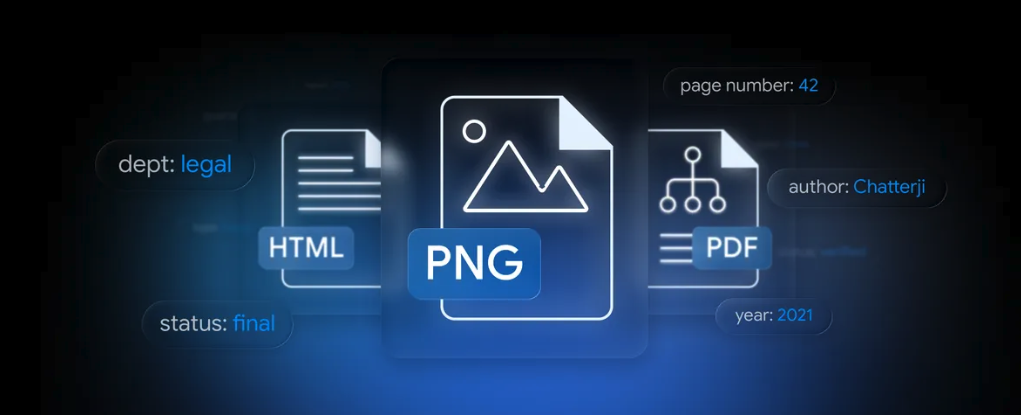
(圖片來源: Google Blog - Gemini API File Search is now multimodal: build efficient, verifiable RAG)
前情提要:RAG 終於不用自己拼樂高了
過去這幾年只要做 RAG(Retrieval-Augmented Generation),開發者腦袋裡浮現的元件清單大概都長這樣:
- 一個 chunker(langchain?自己寫?)
- 一個 embedding model(OpenAI text-embedding-3?Cohere?BGE?)
- 一個向量資料庫(ChromaDB、FAISS、pgvector、Pinecone…挑哪個都要打架)
- 一個檢索 + rerank 的流程
- 然後才是 LLM
更別說多模態 RAG 還要再多一層:圖片怎麼 embed?要不要先 OCR?要不要切兩個 store 文字一個圖片一個?文圖混搜怎麼算分?光是這幾題就能耗掉一個 sprint。
這幾天 Google 在開發者部落格丟出 Expanded Gemini API File Search for multimodal RAG,把上面這條冗長的 pipeline 變成「呼叫一個 managed API」的事,而且圖片是原生支援的。
本文會做兩件事:
- 把新功能拆開講清楚,包含背後的 Gemini Embedding 2 在做什麼。
- 用一隻已開源的 LINE Bot(
kkdai/linebot-multimodal-rag)當作活生生的示範,看新功能怎麼在實際 production code 裡組合起來 — 順便把我除錯時撞到的兩個典型坑分享給大家避雷。
新功能三大重點
依照官方部落格,這次升級的核心就三件事:
1. 真.多模態檔案搜尋(Native Multimodal File Search)
過去的 File Search 是純文字檢索,圖片只能靠 OCR 變成文字才能進 store。
“File Search now processes images and text together. Powered by the Gemini Embedding 2 model, the tool understands native image data.”
現在你可以直接把圖片丟進 File Search Store,跟文字一起被索引。背後的引擎是 Gemini Embedding 2 —— 文字、圖片、影片、音訊、文件共用同一個向量空間,所以你可以「拿圖找文字」、「拿文字找圖」、或者「拿圖找圖」,不用自己對齊空間。
對我們做產品的人來說,這代表:
- 文圖混搜不再是研究題目,是一個 API call。
- 不用維護兩個 store(一個給文字 chunks、一個給 CLIP-style image embeddings)。
- 科學圖表、UI screenshot、報表、相簿…這些以前 OCR 之後損失大半語意的東西,現在能保留原始視覺資訊去檢索。
2. Custom Metadata 與 Server-side 過濾
每一份你丟進 store 的檔案,現在都可以掛上 key-value 標籤:
{"key": "user_id", "string_value": "U1234abcd..."}
{"key": "department", "string_value": "Legal"}
{"key": "status", "string_value": "Final"}
查詢時用 google.aip.dev/160 filter 語法(跟 GCP 大部分 list API 一樣的格式):
metadata_filter='department="Legal" AND status="Final"'
過濾是在 Google 那邊先做 的,不是先撈一堆再丟掉。少了 noise 之後,速度跟精準度都會上升,這對 multi-tenant SaaS 來說根本是救命符 —— 一個 store 配 metadata filter 就能切租戶,不用為了隔離開 N 個 store。
我的 LINE Bot 就直接靠這個做 per-user 資料隔離:每筆檔案上傳時掛上 LINE 的 user_id,查詢時 filter 一帶,使用者 A 永遠不可能在問答中看到使用者 B 的資料。
3. 頁級引用(Page-level Citations)
回應裡的每個被引用片段,現在會帶頁碼。
“captures the page number for every piece of indexed information.”
對企業客戶來說這超關鍵。”AI 跟我說合約第 X 頁有提到 Y” vs. “AI 跟我說合約有提到 Y” —— 前者可以直接被法務 / 稽核接受,後者還要花人力翻書驗證。頁碼解開了「LLM 答案無法溯源」的最後一哩。
多模態的引擎:Gemini Embedding 2
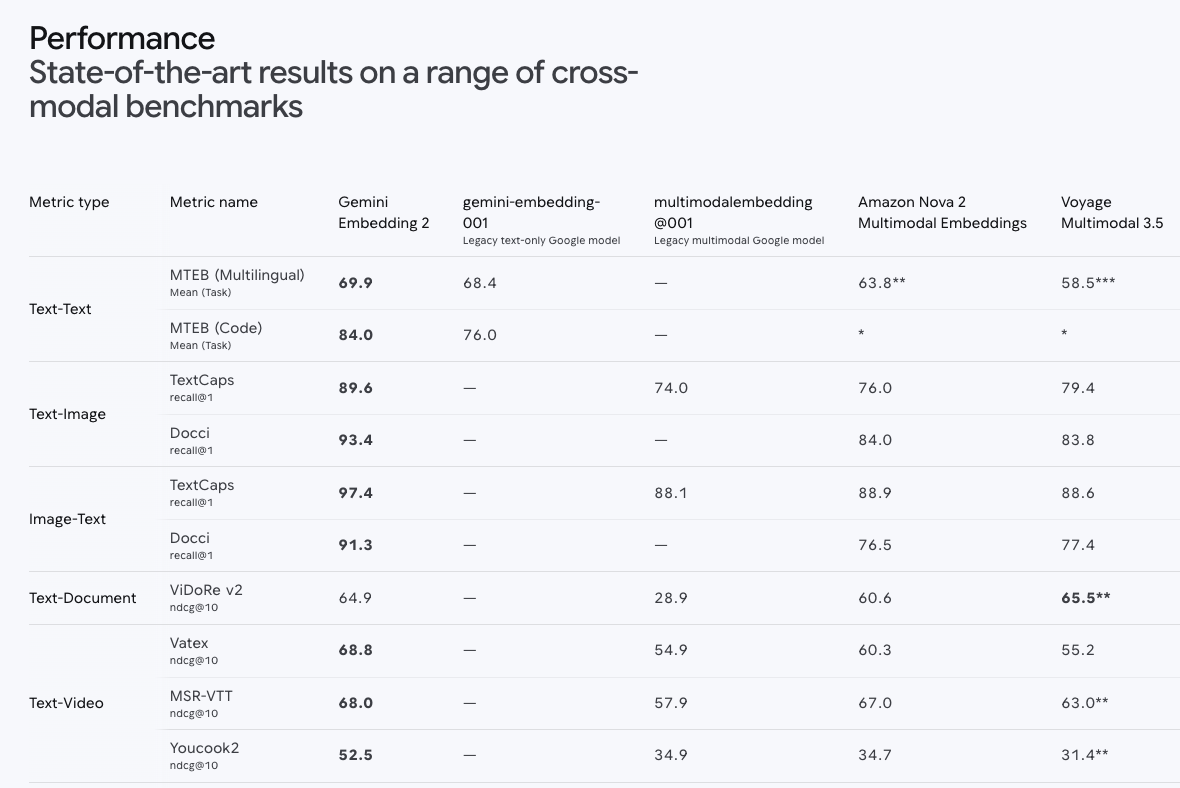
新功能的核心是這顆 Gemini Embedding 2 模型。把它的規格 quote 出來方便你做選型決策:
| 項目 | 規格 |
|---|---|
| 支援輸入 | 文字、圖片、影片、音訊、文件(同一個 embedding space) |
| Input token 上限 | 8,192 tokens |
| Output 維度 | 128 ~ 3,072(用 Matryoshka Representation Learning,小維度也能保有相近精度) |
| 多語支援 | 100+ 語言 |
幾個關鍵 benchmark(recall@1):
- Text-to-Image Search:TextCaps 89.6 / Docci 93.4
- Image-to-Text Search:TextCaps 97.4
- Multilingual (MTEB):mean 69.9
- Video-Text Matching:Vatex ndcg@10 68.8
- Speech-Text Retrieval:MSEB mrr@10 73.9
幾個重點觀察:
- Matryoshka 不是 buzzword:你可以先用 3072 維存進去,跑檢索時切到 768 維跑得快還能維持品質。儲存 / 算分成本可以分階段優化。
- 跨模態分數高得很真實:97.4% recall@1(image→text)代表如果你有一張圖、要找對應的描述文字,幾乎一次就找對。這對「拿手機拍個產品標籤,找對應使用手冊頁面」這類使用情境直接就能落地。
- 100+ 語言:對台灣 / 日韓 / 東南亞市場是很現實的差異點。
開發者真正會在意的事:價格與接入成本
從 Multimodal RAG with the Gemini API File Search tool: a developer guide 這篇官方教學文裡,有兩段是真的對成本敏感的開發者該畫起來:
“Fully managed, with no vector database overhead.”
“Storage and query-time embeddings are free. You only pay for indexing and tokens.”
翻成白話:
- 不用付向量資料庫的錢,也不用付運維它的人月。
- 儲存免費、查詢時的 embedding 計算也免費。
- 你只有兩筆要付:初次 indexing 時的 embedding 費用、以及生成回答時消耗的 LLM tokens。
對個人 side project 跟早期 startup 都是友善的成本曲線 —— 你不需要在第一天就決定「我能不能負擔向量 DB 的 baseline」。
標準工作流程:4 個 SDK call 接完一條 RAG
整理 dev.to guide 後的最小可行流程:
from google import genai
from google.genai import types

client = genai.Client()

# 1. 建立 store(指定多模態 embedding model)
store = client.file_search_stores.create(config={
    "display_name": "my-multimodal-rag",
    "embedding_model": "models/gemini-embedding-2",
})

# 2. 上傳檔案 + 自訂 metadata
operation = client.file_search_stores.upload_to_file_search_store(
    file_search_store_name=store.name,
    file="report-q1.pdf",
    config={
        "display_name": "Q1 Report",
        "custom_metadata": [
            {"key": "department", "string_value": "Finance"},
            {"key": "year", "string_value": "2026"},
        ],
    },
)
# 上傳是 long-running operation,要 poll:
# operation = client.operations.get(operation)

# 3. 把 file_search 當 tool 餵給 generate_content
response = client.models.generate_content(
    model="gemini-3-flash-preview",
    contents="去年第一季的營收成長率是多少?",
    config=types.GenerateContentConfig(
        tools=[types.Tool(file_search=types.FileSearch(
            file_search_store_names=[store.name],
            metadata_filter='department="Finance" AND year="2026"',
        ))],
    ),
)

# 4. 取引用(含頁碼)
for citation in response.candidates[0].grounding_metadata.grounding_chunks:
    print(citation.web.uri, citation.web.title)  # 或對應的 file/page 欄位
要附上引用圖片給使用者,還有 client.file_search_stores.download_media() 可以呼叫。
不誇張,整套多模態 RAG 不到 30 行 code。
演示案例:把這些新功能塞進一隻 LINE Bot
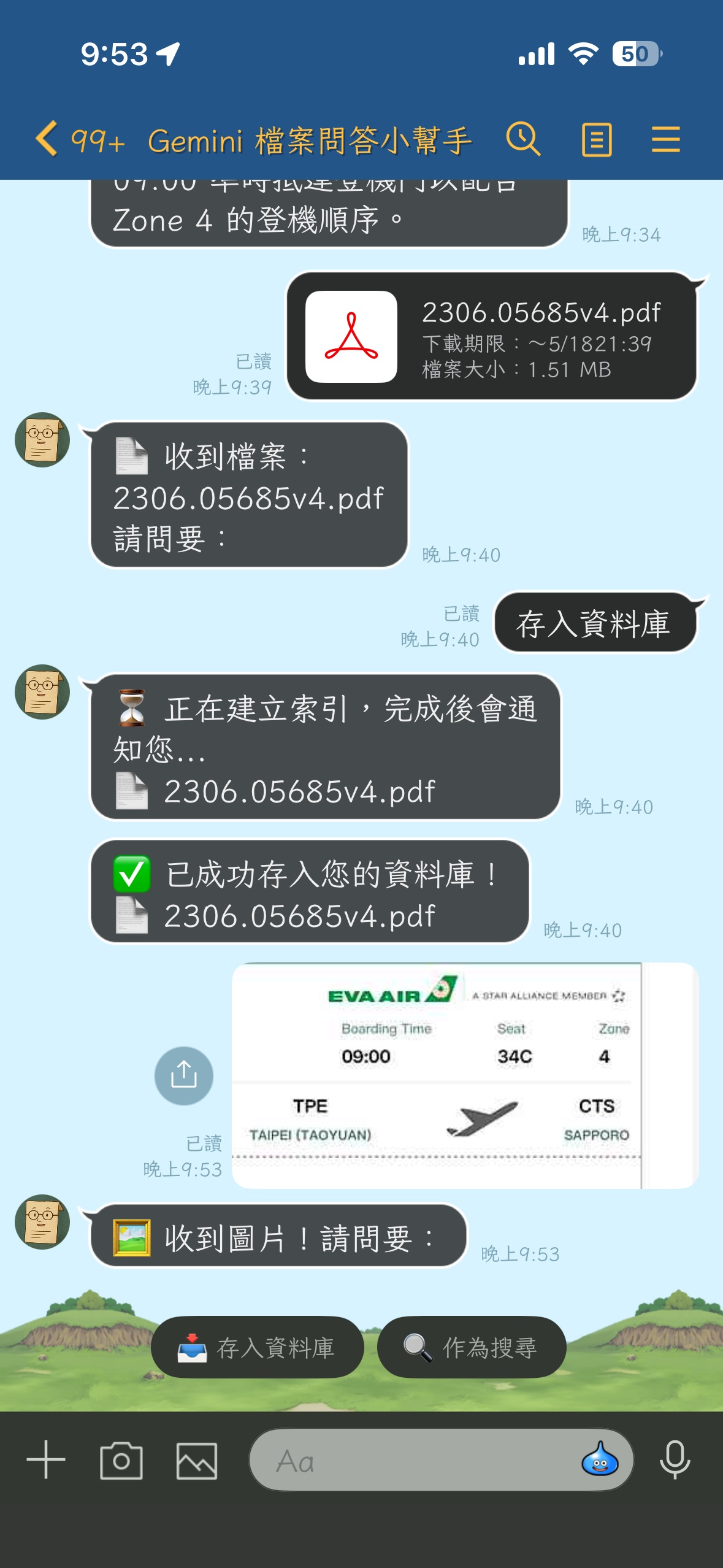
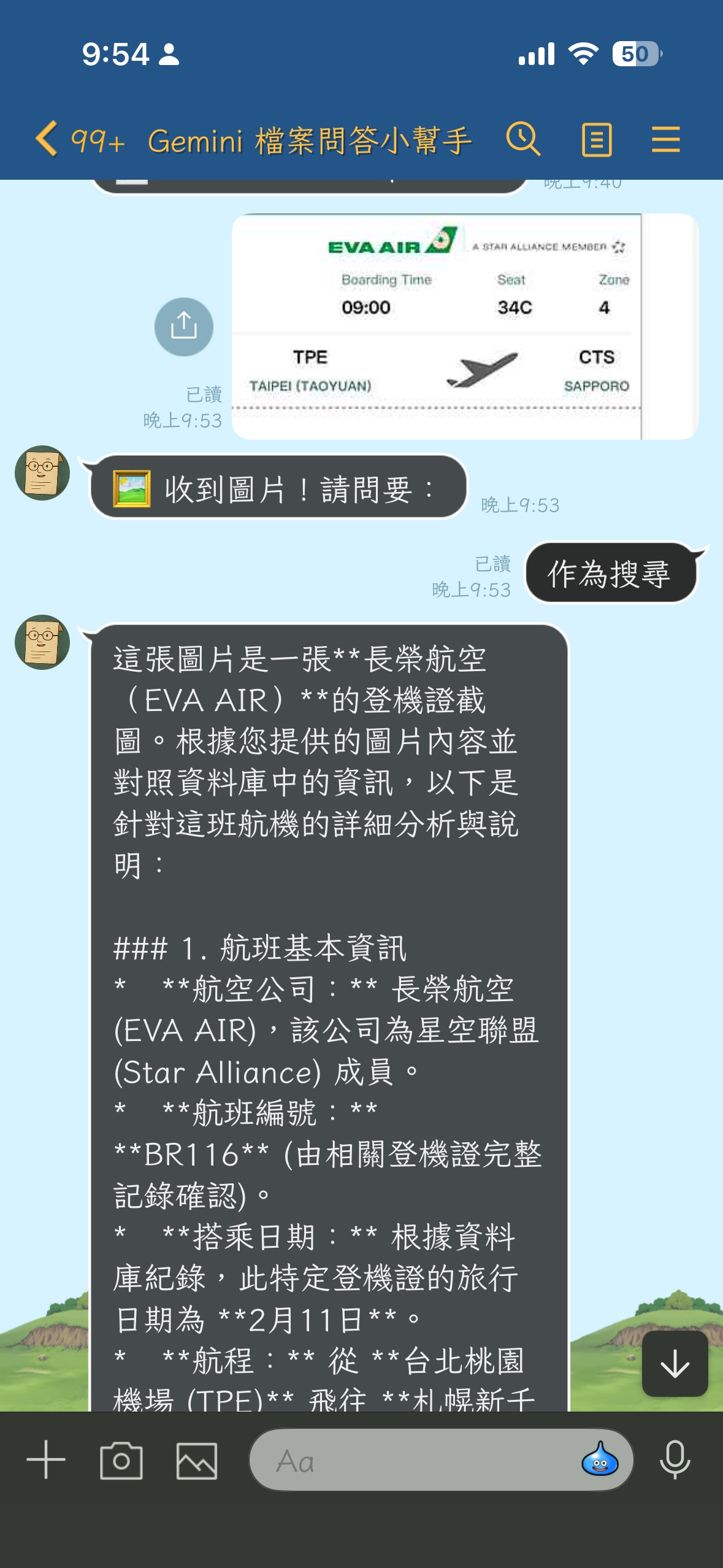
光看 SDK 範例很抽象,所以我把它做成一隻可以上工的 LINE Bot,開源在 kkdai/linebot-multimodal-rag:
- 使用者在 LINE 對話框丟 PDF / 圖片 / 文字檔 → Bot 進 File Search Store 索引。
- 使用者打字問 → Gemini 從這位使用者自己上傳的資料裡找答案。
- 使用者丟一張圖問 → 一樣可以做圖找文字的檢索。
- 部署目標:GCP Cloud Run + Cloud Build 自動部署。
架構非常直觀(重點欄位):
| 元件 | 角色 |
|---|---|
| LINE Webhook | FastAPI 接收訊息事件 |
| GCS | 持久化原檔(uploads/{user_id}/{message_id}.{ext}) |
| Gemini File Search Store | 唯一的索引層(managed) |
Custom metadata user_id |
多租戶隔離 |
| FastAPI BackgroundTasks | 避開 LINE reply token 30 秒上限 |
對照前面講的三大新功能:
- 多模態:使用者丟圖、丟 PDF,都進同一個 store,搜尋時都吃同一條 pipeline。
- Custom metadata:每個 LINE user 的檔案都掛
user_id標籤,查詢時 filter,做到 server-side 強制隔離。 - Page-level citations:未來要在 LINE 訊息裡顯示「答案出自 XX.pdf 第 5 頁」,直接消費
grounding_metadata。
整個 repo 大概不到 600 行 Python,就把一個「自己的私人多模態知識庫聊天 Bot」做完了。
部署實戰:commit → 自動上線
開源範例光跑得起來不夠,要在工作坊現場示範就得是「改 code 推 GitHub 就自動部署」的水準。這次我請 Claude Code 當副駕駛幫我把 CI/CD 接起來。
我只丟了一句:
「幫我建立 Cloud Build 連接 GitHub,commit 到 main 後就 trigger build 部署到 Cloud Run。」
Claude Code 自己先掃 cloudbuild.yaml、現有 Cloud Run 設定、Secret Manager、Artifact Registry,列了一份「目前的問題」,然後停下來問我關鍵決策:要保留現有 service 名稱還是改 yaml?GitHub 要不要授權?等我回答完,它一口氣把缺的資源建起來:
# 建 Artifact Registry repo
gcloud artifacts repositories create linebot \
  --repository-format=docker --location=asia-east1

# 機密搬家:從現役 service 抽到 Secret Manager(透過 stdin,不留 shell history)
gcloud run services describe linebot-gemini-file-search --region=asia-east1 \
  --format='value(...)' \
  | gcloud secrets create LINE_CHANNEL_SECRET --data-file=-

# 給 Cloud Build / Compute SA 部署需要的角色
for role in run.admin iam.serviceAccountUser artifactregistry.writer \
            secretmanager.secretAccessor storage.objectAdmin logging.logWriter; do
  gcloud projects add-iam-policy-binding your-cool-project-id \
    --member="serviceAccount:[email protected]" \
    --role="roles/$role" --condition=None
done

# 建 trigger
gcloud builds triggers create github \
  --name=linebot-multimodal-rag-main \
  --repo-owner=kkdai --repo-name=linebot-multimodal-rag \
  --branch-pattern="^main$" --build-config=cloudbuild.yaml
唯一不能自動化的是 GitHub OAuth 授權 —— Claude Code 直接坦白告訴我「這步只能去 Console 點」,附上 URL 跟逐步指引。一分鐘點完回來,trigger 就跑通了。
踩坑紀錄:兩個跟新功能直接相關的雷
踩坑一:寫死的 Model ID 過時
cloudbuild.yaml 跟 code 預設值都寫了 gemini-3.1-flash,但翻了一下 Gemini API 目前的 model id 清單:根本沒這個 model。Gemini 3 Flash 正確的 ID 是 gemini-3-flash-preview。
為什麼會發生:multimodal RAG 是一個非常新的功能,相關文件、教學、範例都還在大量誕生中,命名也微調過。Repo 初版很容易寫到一個「看起來像但其實不存在」的 id。
解法:全 repo 改成 gemini-3-flash-preview,順便確認 embedding model 是 models/gemini-embedding-2(對的,沒踩到雷)。Push 之後 Cloud Build 自動 trigger、三分鐘新 revision 上線。
踩坑二:神祕的「Upload has already been terminated」
這個雷直接踩在 File Search Store 新支援的「圖片上傳」這條 path 上 —— 也是最值得分享的一個,因為它示範了「新 API 的錯誤訊息有時候很委婉」。
我從 LINE 傳了一張 JPG 給 Bot 點「存入資料庫」,結果:
❌ 存入失敗:400 Bad Request. {'message': 'Upload has already been terminated.', 'status': 'Bad Request'}
完全看不出原因。Cloud Logging 也只有同一行錯誤,沒有 stack trace。上 Google AI Developers Forum 翻一輪,發現好幾種 file type(.md / .xlsx / 大 CSV)都有人遇過類似回報。
真正的元兇藏在這段看起來無辜的程式碼:
# app/gemini_service.py(修改前)
suffix = mimetypes.guess_extension(mime_type) or ".bin"
with tempfile.NamedTemporaryFile(suffix=suffix, delete=False) as tmp:
    tmp.write(file_bytes)
    tmp_path = tmp.name
在 Python 3.13 之前,mimetypes.guess_extension("image/jpeg") 回傳的是 .jpe,不是 .jpg。原因是標準函式庫的 MIME 表裡 .jpe 字典序排在 .jpg 前面,這個怪癖存在了將近二十年。
Gemini File Search Store 看到副檔名 .jpe 不認得,但 API 回的訊息又用「Upload has already been terminated」這種非常容易誤導人的講法 —— 一開始我還以為是上傳大小超過、或被併發掐住、或是 SDK 內部有 race。
修法:副檔名直接從 display_name 取(handlers 已經正確設成 image_<id>.jpg),備援用一張顯式 MIME 對照表:
# app/gemini_service.py(修改後)
_MIME_TO_EXT = {
    "image/jpeg": ".jpg",
    "image/png": ".png",
    "image/webp": ".webp",
    "application/pdf": ".pdf",
    # ...
}

if "." in display_name:
    suffix = "." + display_name.rsplit(".", 1)[-1].lower()
else:
    suffix = _MIME_TO_EXT.get(mime_type) or mimetypes.guess_extension(mime_type) or ".bin"

print(f"[BG Store] uploading display_name={display_name!r} mime={mime_type} "
      f"size={len(file_bytes)} tmp_suffix={suffix}")
順手把 except 那邊也補上 traceback.format_exc(),這樣下次出事 Cloud Logging 就會有完整堆疊。
這個故事的 takeaway:當你在用「新 GA 沒多久的 API」上跑新 modality 時,請務必:
- 在客戶端先確認你產生的檔名 / 副檔名是 API 預期的格式,不要相信
mimetypes標準庫幫你猜的。 - 把 stack trace 寫進 log,不然 forum 上那種「換一個檔案就好了」的玄學討論你救不了自己。
- 從 Gemini File Search 官方支援格式清單 對照你產生的副檔名一致。
總結:multimodal RAG 的入場費,史上最低
這次的 Gemini API File Search 升級,把一條過去要做 3 個月才能上線的功能線壓縮成「幾十行 code + 一個 managed API」就能跑:
- 多模態天生支援:文字、圖片、影片、音訊、文件共享同一個 embedding 空間,再見 OCR 過渡層。
- Custom metadata + server-side filter:multi-tenant SaaS 不用糾結 store 切多少個了。
- Page-level citations:企業合規場景終於有原生 grounding。
- 管錢友善:storage / query embedding 都不用錢,只付 indexing + LLM tokens。
- Embedding 2 的跨模態分數:97.4% recall@1 不是 demo 數字,是直接能撐住產品的等級。
如果你想直接看一個 production-shaped 的端到端範例:kkdai/linebot-multimodal-rag 整個 repo PR welcome,也歡迎拿去改成你自己領域的 RAG 應用 —— Notion 知識庫、員工手冊問答機、相簿管家、研究論文索引…大概只有想像力會限制你。
想開始的話,建議的閱讀順序:
- Google 官方部落格:Expanded Gemini API File Search for multimodal RAG
- Gemini Embedding 2 規格頁:deepmind.google/models/gemini/embedding
- 開發者實作指南:Multimodal RAG with the Gemini API File Search tool: a developer guide
- 我的開源範例:github.com/kkdai/linebot-multimodal-rag
歡迎大家一起來試試看這個很強大的 Multimodal RAG 的支援吧!
- Google Cloud (10) ,
- Gemini API (7) ,
- Gemini Embedding 2 (1) ,
- File Search (3) ,
- Multimodal RAG (1) ,
- LINE Bot (24) ,
- Cloud Run (14) ,
- Cloud Build (1)

