
前情提要
Google 在 2026 年 3 月底發佈了 Gemini 3.1 Flash Live,主打「讓音訊 AI 更自然、更可靠」。這個模型專門針對即時雙向語音對話設計,低延遲、可中斷、支援多語言。
剛好手邊有一個 LINE Bot 專案(linebot-helper-python)——它已經能處理文字、圖片、URL、PDF、YouTube,唯獨語音訊息完全不理:
用戶傳送語音訊息
Bot:(沉默)
這次就把語音支援補進去,順便分享幾個踩過的坑。
設計決策:Flash Live 還是標準 Gemini API?
第一個問題:Gemini 3.1 Flash Live 是為即時串流設計的,但 LINE 的語音訊息是預錄好的 m4a 檔案,不是即時音訊流。
用 Flash Live 處理預錄檔案,就像用直播攝影機拍照——技術上可行,但工具選錯了。
決定用標準 Gemini API——直接把音訊 bytes 當 inline data 傳進去,一次呼叫拿到轉錄文字。更簡單、更適合這個場景。

架構設計
整合思路
這個 repo 已經有完整的 Orchestrator 架構,會依照訊息內容自動路由到不同 Agent(Chat、Content、Location、Vision、GitHub)。語音訊息的目標很明確:
把語音轉成文字,然後當成一般文字訊息丟進 Orchestrator——讓現有的所有功能自動支援語音輸入。
使用者說「幫我搜尋附近的加油站」→ 轉錄成文字 → Orchestrator 判斷是地點查詢 → LocationAgent 處理。不需要為語音另外實作邏輯。
完整流程
用戶傳送 AudioMessage(m4a)
    │
    ▼ handle_audio_message()
    │
    ├─ ① LINE SDK 下載音訊 bytes
    │       get_message_content(message_id) → iter_content()
    │
    ├─ ② Gemini 轉錄
    │       tools/audio_tool.py → transcribe_audio()
    │       model: gemini-3.1-flash-lite-preview
    │
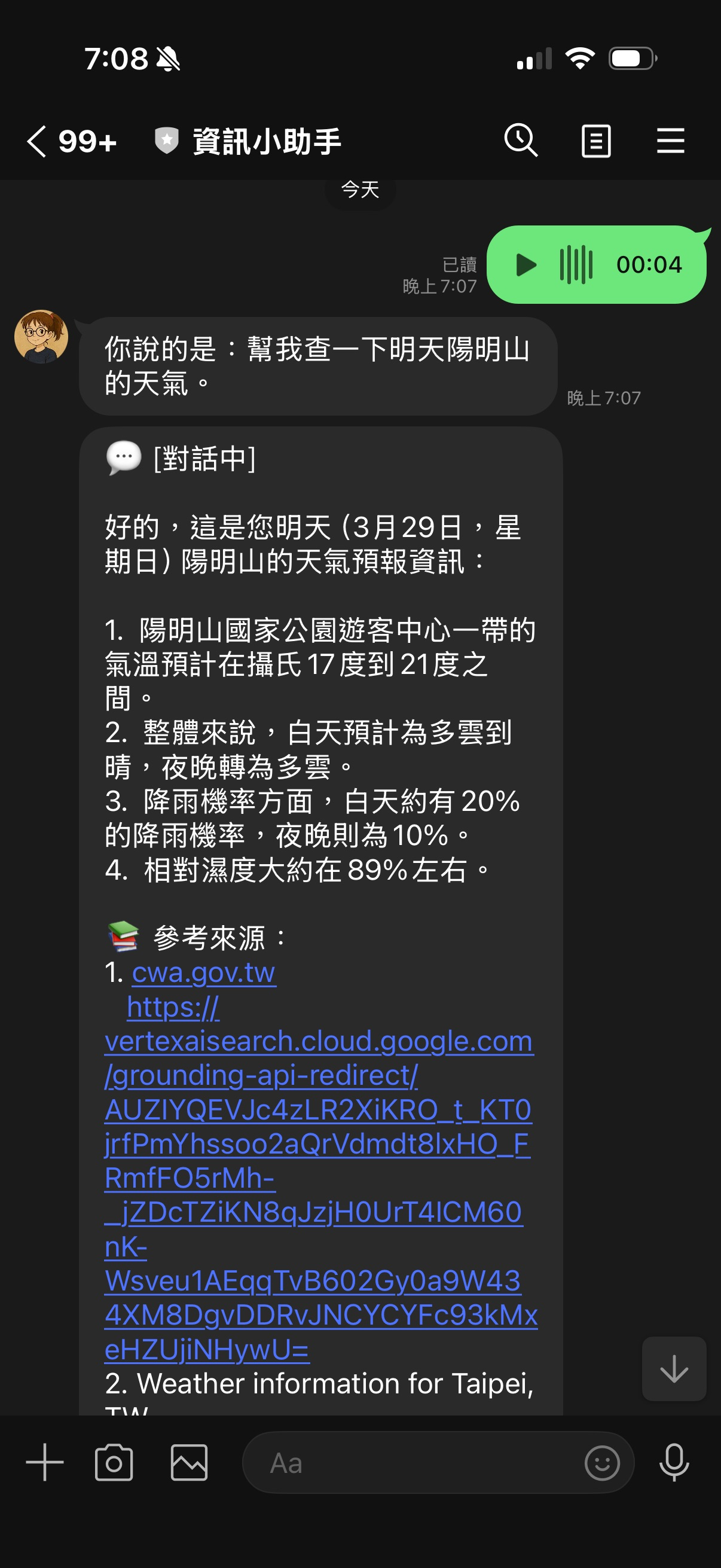
    ├─ ③ Reply #1:「你說的是:{transcription}」
    │       reply_message()(消耗 reply token)
    │
    └─ ④ Reply #2:Orchestrator 路由
            handle_text_message_via_orchestrator(push_user_id=user_id)
            ↓
            push_message()(reply token 已用掉,改用 push)
為什麼要兩段回覆?
回覆分成兩則,讓使用者立刻看到轉錄結果,不用等 Orchestrator 處理完才知道 Bot 有沒有聽懂自己說什麼。
核心程式碼詳解
Step 1:音訊轉錄工具(tools/audio_tool.py)
from google import genai
from google.genai import types

TRANSCRIPTION_MODEL = "gemini-3.1-flash-lite-preview"

async def transcribe_audio(audio_bytes: bytes, mime_type: str = "audio/mp4") -> str:
    """
    Transcribe audio bytes to text using Gemini.
    LINE 語音訊息固定是 m4a,MIME type 固定填 audio/mp4。
    """
    client = genai.Client(
        vertexai=True,
        project=os.getenv("GOOGLE_CLOUD_PROJECT"),
        location=os.getenv("GOOGLE_CLOUD_LOCATION", "us-central1"),
    )

    audio_part = types.Part.from_bytes(data=audio_bytes, mime_type=mime_type)

    response = await client.aio.models.generate_content(
        model=TRANSCRIPTION_MODEL,
        contents=[
            types.Content(
                role="user",
                parts=[
                    audio_part,
                    types.Part(text="請將以上語音內容完整轉錄成文字,保留原語言,不要加任何說明或前綴。"),
                ],
            )
        ],
    )

    return response.text or ""
設計原則:函式本身不 catch exception,讓上層 handler 統一處理錯誤回覆。
Step 2:handler 主流程(main.py)
async def handle_audio_message(event: MessageEvent):
    """Handle audio (voice) messages — transcribe and route through Orchestrator."""
    user_id = event.source.user_id
    replied = False  # 追蹤 reply token 是否已使用
    try:
        # 下載音訊
        message_content = await line_bot_api.get_message_content(event.message.id)
        audio_bytes = b""
        async for chunk in message_content.iter_content():
            audio_bytes += chunk

        # 轉錄
        transcription = await transcribe_audio(audio_bytes)

        # 空轉錄(無聲或太短)
        if not transcription.strip():
            await line_bot_api.reply_message(
                event.reply_token,
                [TextSendMessage(text="無法辨識語音內容,請重新錄製。")]
            )
            return

        # Reply #1:讓使用者確認轉錄結果(消耗 reply token)
        await line_bot_api.reply_message(
            event.reply_token,
            [TextSendMessage(text=f"你說的是:{transcription.strip()}")]
        )
        replied = True

        # Reply #2:送進 Orchestrator,用 push_message(token 已用掉)
        await handle_text_message_via_orchestrator(
            event, user_id,
            text=transcription.strip(),
            push_user_id=user_id,
        )

    except Exception as e:
        logger.error(f"Error handling audio for {user_id}: {e}", exc_info=True)
        error_text = LineService.format_error_message(e, "處理語音訊息")
        error_msg = TextSendMessage(text=error_text)
        if replied:
            # reply token 已消耗,改用 push
            await line_bot_api.push_message(user_id, [error_msg])
        else:
            await line_bot_api.reply_message(event.reply_token, [error_msg])
Step 3:讓 Orchestrator 支援外部傳入文字
原本的 handle_text_message_via_orchestrator 直接讀 event.message.text,AudioMessage 沒有 .text,所以加兩個 optional 參數:
async def handle_text_message_via_orchestrator(
    event: MessageEvent,
    user_id: str,
    text: str = None,           # ← 外部傳入文字(語音轉錄)
    push_user_id: str = None,   # ← 設定時改用 push_message
):
    msg = text if text is not None else event.message.text.strip()
    try:
        result = await orchestrator.process_text(user_id=user_id, message=msg)
        response_text = format_orchestrator_response(result)
        reply_msg = TextSendMessage(text=response_text)

        if push_user_id:
            await line_bot_api.push_message(push_user_id, [reply_msg])
        else:
            await line_bot_api.reply_message(event.reply_token, [reply_msg])
    except Exception as e:
        error_msg = TextSendMessage(text=LineService.format_error_message(e, "處理您的問題"))
        if push_user_id:
            await line_bot_api.push_message(push_user_id, [error_msg])
        else:
            await line_bot_api.reply_message(event.reply_token, [error_msg])
text is not None(而非 text or ...)是刻意的——萬一語音轉錄出空字串,要讓空字串通過(然後被上層的 if not transcription.strip() 攔掉),不是 fallback 到 event.message.text。
踩過的坑
❌ 坑 1:Part.from_text() 不接受 positional argument
最先遇到的 TypeError:
# ❌ 錯誤(TypeError: Part.from_text() takes 1 positional argument but 2 were given)
types.Part.from_text(
    "請將以上語音內容完整轉錄成文字,保留原語言,不要加任何說明或前綴。"
)

# ✅ 正確
types.Part(text="請將以上語音內容完整轉錄成文字,保留原語言,不要加任何說明或前綴。")
在這個版本的 SDK 中,Part.from_text() 的 text 是 keyword argument,或者直接用 Part(text=...) 建構子更保險。
❌ 坑 2:LINE reply token 只能用一次
LINE 的 reply token 是一次性的。一旦呼叫 reply_message(),token 就失效了。
這個專案的語音流程會呼叫兩次:
- Reply #1(顯示轉錄文字)→ 消耗 token
- Reply #2(Orchestrator 結果)→ token 已失效,會收到 LINE 400 error
解法是讓 Orchestrator handler 支援 push_message 模式(透過 push_user_id 參數),Reply #2 改走 push_message。
錯誤處理也要注意:如果 Reply #1 成功後 Orchestrator 才拋例外,except block 裡也不能再用 reply_message,同樣要改成 push_message。這就是程式碼裡 replied flag 的用途。
❌ 坑 3:Gemini Flash Live 不適合預錄檔案
不是真正的「坑」,但值得說清楚:
Gemini 3.1 Flash Live 是為即時雙向串流設計,有連線建立和串流協定的開銷。LINE 語音訊息是完整的預錄 m4a,一次性處理即可。
直接用 client.aio.models.generate_content() 傳 inline audio bytes,更簡單,延遲也不差。Flash Live 留給真正需要即時對話的場景。
效果展示
場景 1:語音指令查詢
用戶傳送:[語音] 幫我搜尋台北車站附近的咖啡廳

Bot Reply #1:你說的是:幫我搜尋台北車站附近的咖啡廳
Bot Reply #2:[LocationAgent 回覆附近咖啡廳清單]
場景 2:語音問問題
用戶傳送:[語音] Gemini 和 GPT-4 有什麼差別

Bot Reply #1:你說的是:Gemini 和 GPT-4 有什麼差別
Bot Reply #2:[ChatAgent 搭配 Google Search Grounding 回覆比較結果]
場景 3:語音發 URL
用戶傳送:[語音] 幫我摘要這篇文章 https://example.com/article

Bot Reply #1:你說的是:幫我摘要這篇文章 https://example.com/article
Bot Reply #2:[ContentAgent 抓取並摘要文章]
語音轉錄出來的文字直接進 Orchestrator,現有的 URL 偵測、意圖判斷全部照常運作,零額外邏輯。
傳統文字輸入 vs 語音輸入
| 文字輸入 | 語音輸入 | |
|---|---|---|
| 輸入格式 | TextMessage | AudioMessage(m4a) |
| 前處理 | 無 | Gemini 轉錄 |
| reply token | 直接用 | Reply #1 消耗,Reply #2 改 push |
| Orchestrator | 直接路由 | 轉錄文字後路由 |
| 支援功能 | 全部 | 全部(無需額外設定) |
| 錯誤處理 | reply_message | replied flag 判斷 reply/push |
分析與展望
這次整合最讓我滿意的是幾乎不用改 Orchestrator 本身。只要在輸入端把語音轉成文字,後面所有的路由邏輯、Agent 呼叫、錯誤處理全都自動繼承。
Gemini 的多模態音訊理解在這個場景裡表現很穩——繁體中文、台語腔調、夾雜英文的句子基本上都能準確轉錄。
未來可以延伸的方向:
- 多語言自動偵測:轉錄時告訴 Gemini 保留原語言,日文語音→日文轉錄,再由 Orchestrator 決定要不要翻譯
- 群組語音支援:目前只限 1:1,群組的語音訊息暫時忽略
- 長錄音摘要:超過一定長度的錄音直接走 ContentAgent 做摘要,而非當指令處理
延伸:🔊 朗讀摘要——讓 Bot 說話
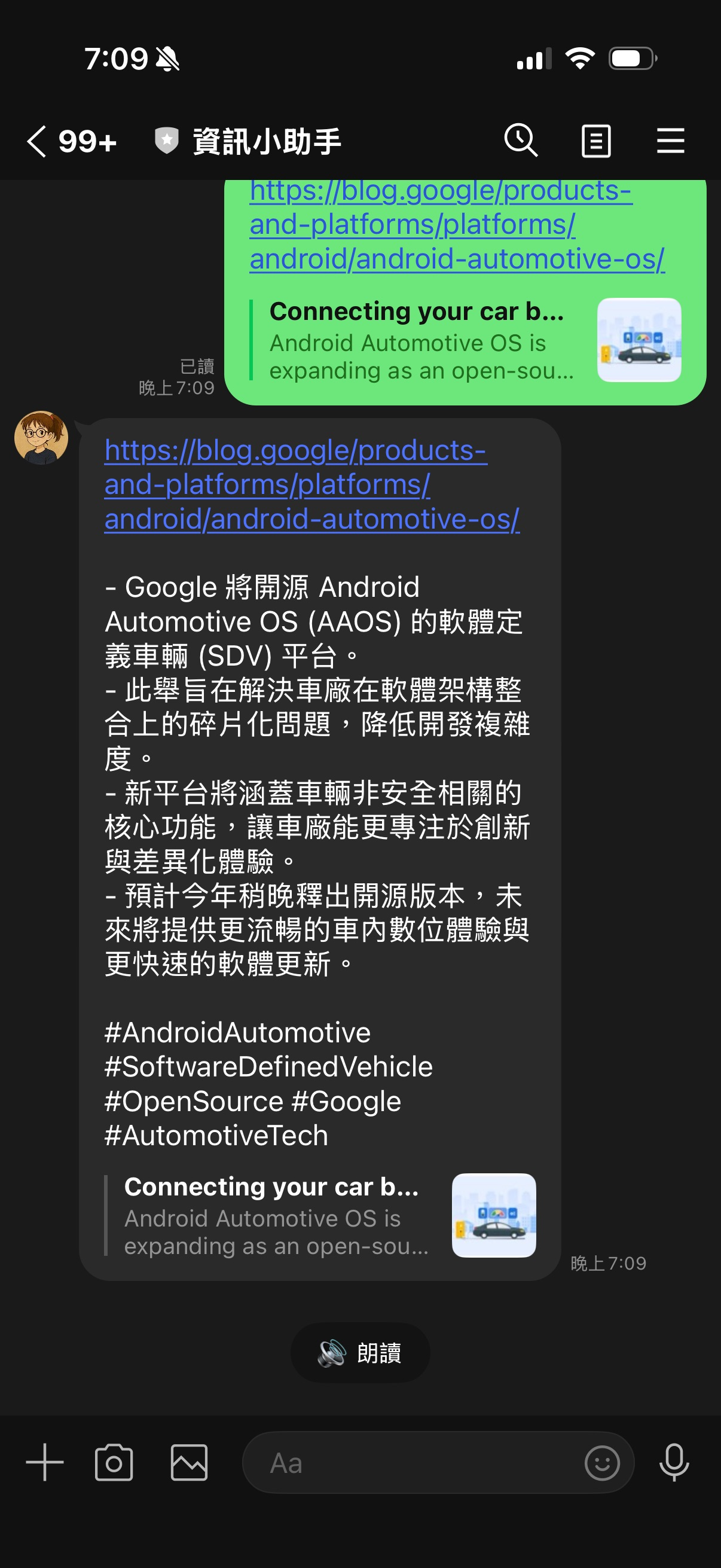
語音辨識讓 Bot「聽懂」使用者說的話。這件事做完之後,自然就有了下一個問題:
Bot 能不能說話回應?
Gemini Live API 有一個 response_modalities: ["AUDIO"] 的設定,可以直接輸出音訊 PCM 串流。我把它接上了另一個場景——朗讀摘要。
功能設計
每次 Bot 摘要完一個 URL、YouTube 或 PDF,訊息底下都會出現「🔊 朗讀」的 QuickReply 按鈕。使用者按下去,Bot 把摘要文字送進 Gemini Live TTS,把 PCM 音訊轉成 m4a,然後用 AudioSendMessage 傳回去。
URL 摘要完成
    │
    ▼ [🔊 朗讀] QuickReply 按鈕
    │
用戶按下按鈕 → PostbackEvent
    │
    ▼ handle_read_aloud_postback()
    │
    ├─ ① 從 summary_store 取出摘要文字(10 分鐘 TTL)
    │
    ├─ ② Gemini Live API → PCM 音訊
    │       model: gemini-live-2.5-flash-native-audio
    │       response_modalities: ["AUDIO"]
    │
    ├─ ③ ffmpeg 轉檔:PCM → m4a
    │       s16le, 16kHz, mono → AAC
    │
    └─ ④ AudioSendMessage 傳給使用者
            original_content_url: /audio/{uuid}
            duration: {ms}
核心程式碼(tools/tts_tool.py)
LIVE_MODEL = "gemini-live-2.5-flash-native-audio"

async def text_to_speech(text: str) -> tuple[bytes, int]:
    client = genai.Client(vertexai=True, project=VERTEX_PROJECT, location="us-central1")
    config = {"response_modalities": ["AUDIO"]}

    async with client.aio.live.connect(model=LIVE_MODEL, config=config) as session:
        await session.send_client_content(
            turns=types.Content(role="user", parts=[types.Part(text=text)]),
            turn_complete=True,
        )
        pcm_chunks = []
        async for message in session.receive():
            if message.server_content and message.server_content.model_turn:
                for part in message.server_content.model_turn.parts:
                    if part.inline_data and part.inline_data.data:
                        pcm_chunks.append(part.inline_data.data)
            if message.server_content and message.server_content.turn_complete:
                break

    pcm_bytes = b"".join(pcm_chunks)
    duration_ms = int(len(pcm_bytes) / 32000 * 1000)  # 16kHz × 16-bit mono

    # PCM → m4a(temp file 模式,避免 moov atom 問題)
    with tempfile.NamedTemporaryFile(suffix=".pcm", delete=False) as f:
        f.write(pcm_bytes)
        pcm_path = f.name
    m4a_path = pcm_path.replace(".pcm", ".m4a")
    subprocess.run(
        ["ffmpeg", "-y", "-f", "s16le", "-ar", "16000", "-ac", "1",
         "-i", pcm_path, "-c:a", "aac", m4a_path],
        check=True, capture_output=True,
    )
    with open(m4a_path, "rb") as f:
        return f.read(), duration_ms
朗讀功能踩的坑
❌ 坑 4:模型名稱完全不同
Gemini Live TTS 的第一個嘗試是:
LIVE_MODEL = "gemini-3.1-flash-live-preview"
照著語音辨識用的 gemini-3.1-flash-lite-preview 推導的,結果直接 1008 policy violation:
Publisher Model `projects/line-vertex/locations/global/publishers/google/
models/gemini-3.1-flash-live-preview` was not found
列出 Vertex AI 可用模型才發現,Live/native audio 的模型命名規則完全不同:
# ✅ 正確
LIVE_MODEL = "gemini-live-2.5-flash-native-audio"
Gemini 3.1 在 Vertex AI 上沒有 Live 版本。Live/native audio 功能目前是 2.5 世代,命名格式是 gemini-live-{version}-{variant}-native-audio,跟一般模型的 gemini-{version}-flash-{variant} 完全是兩套邏輯。
❌ 坑 5:GOOGLE_CLOUD_LOCATION=global 讓 Live API 失聯
換了正確的模型名稱之後,錯誤訊息還是一樣:
Publisher Model `projects/line-vertex/locations/global/...` was not found
這次 model 名稱正確了,但 locations/global 很奇怪——我們明明設定了 us-central1。
追查 Google GenAI SDK 的原始碼發現:
# _api_client.py
self.location = location or env_location
if not self.location and not self.api_key:
    self.location = 'global'  # ← 這裡
location or env_location——如果傳進去的 location 是空字串,就會 fallback 到 global。
問題根源是 Cloud Run 的環境變數:
{ "name": "GOOGLE_CLOUD_LOCATION", "value": "global" }
GOOGLE_CLOUD_LOCATION 被設成了 "global" 字串。os.getenv("GOOGLE_CLOUD_LOCATION", "us-central1") 拿到的不是 "us-central1",而是 "global"——然後 SDK 乖乖連到 global endpoint,但 gemini-live-2.5-flash-native-audio 在 global 沒有 BidiGenerateContent 支援。
| Endpoint | 標準 API | Live API |
|---|---|---|
global |
✅ 可用 | ❌ 模型不在這裡 |
us-central1 |
✅ 可用 | ✅ gemini-live-2.5-flash-native-audio |
解法:Live API 的 location 直接硬寫,不從 env var 讀:
# ❌ 受 GOOGLE_CLOUD_LOCATION=global 影響
VERTEX_LOCATION = os.getenv("GOOGLE_CLOUD_LOCATION", "us-central1")

# ✅ 硬寫,不受 env var 干擾
VERTEX_LOCATION = "us-central1"  # Live API 需要 regional endpoint
語音辨識 vs 朗讀摘要
兩個功能用了完全不同的 Gemini API:
| 語音辨識 | 朗讀摘要 | |
|---|---|---|
| 方向 | 音訊 → 文字 | 文字 → 音訊 |
| API | 標準 generate_content |
Live API BidiGenerateContent |
| 模型 | gemini-3.1-flash-lite-preview |
gemini-live-2.5-flash-native-audio |
| Location | 跟著 env var | 硬寫 us-central1 |
| 輸出格式 | text | PCM → ffmpeg → m4a |
| LINE 訊息類型 | 輸入:AudioMessage |
輸出:AudioSendMessage |
總結
Gemini 3.1 Flash Live 的發布讓音訊 AI 更值得認真對待。這次把語音辨識和朗讀摘要都接進了 LINE Bot:
- 語音辨識:標準 Gemini API,預錄 m4a 一次轉錄,接進現有 Orchestrator
- 朗讀摘要:Gemini Live TTS,摘要文字轉 PCM,ffmpeg 轉 m4a,
AudioSendMessage傳回
最麻煩的不是功能本身,而是找到正確的模型名稱和定位 SDK 的 location 邏輯——這兩個都沒有在文件顯眼的地方寫清楚,只能靠列出可用模型、讀 SDK 原始碼才找到答案。
完整程式碼在 GitHub,歡迎參考。
我們下次見!

