
前情提要:從單機原型到雲端生產級 AI Agent 的五階段演進
歡迎來到《Agent Platform 實戰》系列的第六篇(最終章)!回顧過去五篇文章,我們帶著 LINE AI 名片王 (kkdai/line-card-assistant) 一路闖關,完成了從本地原型到企業級 AI Agent 架構的四大階段:
- [Agent Platform 實戰 (1)] 用 Go 與 Google ADK 2.0 Graph Workflow 打造 LINE AI 名片王:以
google.golang.org/adk/v2/workflow實作涵蓋 Vision OCR、AddFanOut/AddFanIn平行背景調查與NewRequestInputEventHITL 互動迴圈的名片工作流圖。 - [Agent Platform 實戰 (2)] 從單體 Cloud Run 邁向 Google Cloud Agent Runtime:用 agents-cli 與 ADK Go 重構 LINE AI 名片王:完成 Phase 1(PR #10),將專案標準化為
agents-cli(adk_go) 雙通道架構,同時支援 LINE Webhook、ADK WebUI Playground 與 A2A 協定。 - [Agent Platform 實戰 (3)] 破解無狀態容器的 HITL 失憶症:用 ADK 2.0 GCS Artifact Service 與 Agent Platform Sessions 實現跨實例名片辨識與暫停恢復:完成 Phase 2 前半(PR #11),導入
artifact/gcsartifact與session/vertexai解決無狀態容器的跨實例 HITL 恢復與圖片儲存問題。 - [Agent Platform 實戰 (4)] 邁向雲端雙層解耦與全持久化:用 Cloud Run LINE Webhook Gateway、Agent Runtime 與 Cloud SQL PostgreSQL 完成 LINE AI 名片王架構拼圖:完成 Phase 2 後半(Issue #5) 與 Phase 3(Issue #6,PR #12),將名片庫遷移至 Cloud SQL PostgreSQL (
PostgresStore),並打造無狀態的 Cloud Run LINE Webhook Gateway (internal/gateway)。 - [Agent Platform 實戰 (5)] 打造 AI Agent 的品質飛輪 (Quality Flywheel):用 agents-cli eval 與 ADK 2.0 Go 為 LINE AI 名片王建立自動化評估基準:完成 Phase 4(Issue #7,PR #13),用
agents-cli eval建立涵蓋 6 個黃金案例與 4 大評估指標全數1.0000的自動化品質飛輪。
今天這篇最終章,我們要一口氣完成 Roadmap #9 的最後一塊拼圖 —— Phase 5(Issue #8):Agent Runtime 正式部署、Terraform IaC、GitHub Actions CI/CD 與 Cloud Trace 全棧可觀測性!
一、Phase 5 解決什麼問題?從「手動 gcloud 指令」走向「宣告式 AgentOps」
在許多 AI 專案中,即便程式碼與評估測試都寫好了,上了生產環境(Production)卻常常因為以下四個問題而變成維運惡夢:
- 基礎設施靠手動敲指令(ClickOps / Shell Script 漂移):
Vertex AI Reasoning Engine、Service Account IAM 權限、GCS Bucket、Secret Manager 密鑰與 Cloud SQL 若全靠手動下
gcloud建立,Staging 與 Production 環境很容易發生設定不一致。 - PR 合併缺乏 AI 品質守門員(No Eval Gate in CI):
只跑
go test能抓出語法與邏輯錯誤,但如果有人不小心改壞了 Graph Node 的state_delta或 Prompt,如何在 PR 合併進main之前自動攔截? - 跨環境部署與高併發驗證(Staging $\rightarrow$ Load Test $\rightarrow$ Prod Approval):
推送到
main後,如何透過無金鑰的 Workload Identity Federation (WIF) 自動部署到 Staging、跑完高併發壓測(Vegeta Load Test)並將壓測報告歸檔至 GCS,最後經過人工審核(GitHub Environment Approval Gate)才推上 Production? - Graph Workflow 節點級可觀測性(Node-Level Distributed Tracing):
當一張名片從上傳到產生 Flex Message 預覽花了 2.8 秒,到底時間是花在
VisionOCRNode、還是平行 Fan-Out 裡的CompanyEnrichNode(Google Search Grounding)?我們需要讓 ADK 2.0 Graph Workflow 的每一個節點都在 Google Cloud Trace 中展開成一目了然的巢狀 Span 樹,並自動匯入 BigQuery 進行 P95/P99 延遲與 Token 成本分析!
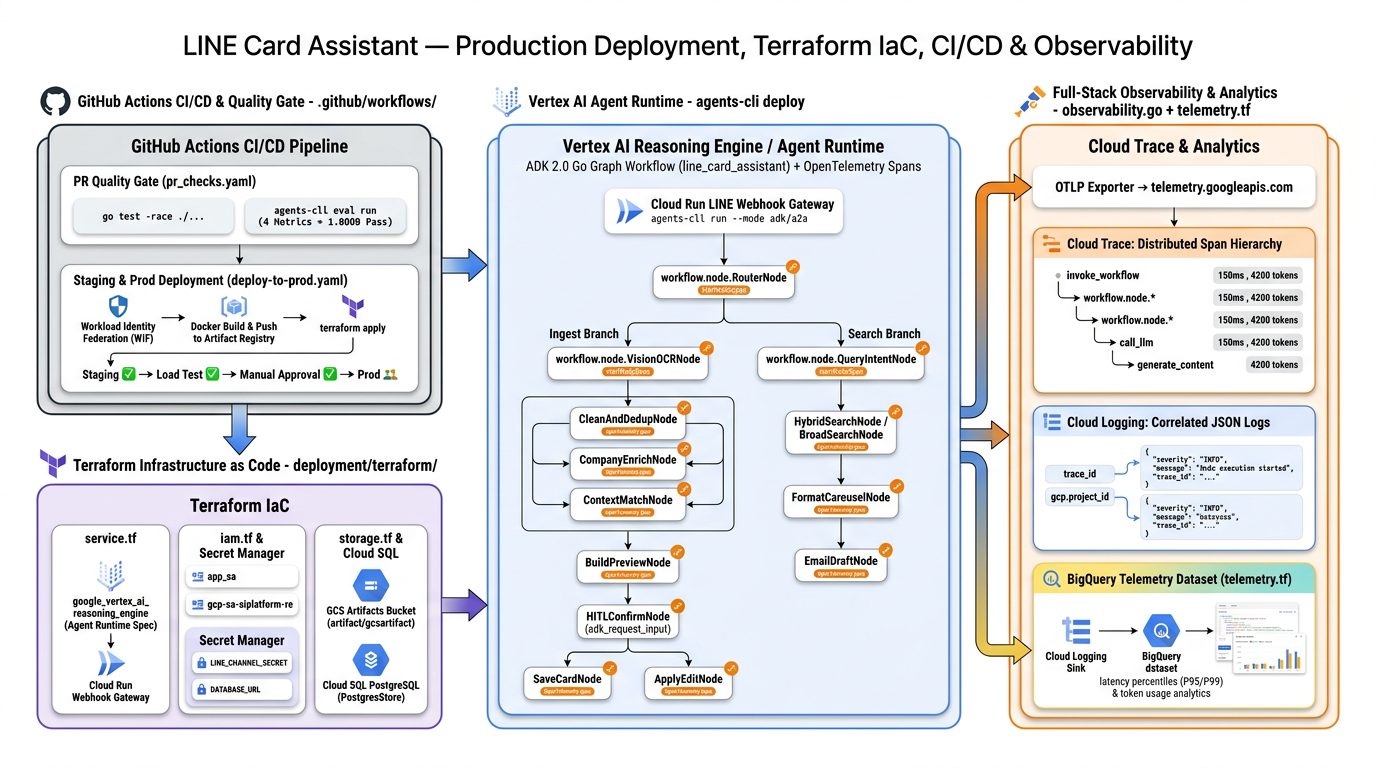
這正是文章開頭那張 Phase 5 全棧架構圖 所描繪的四大核心支柱:
- 左上(GitHub Actions CI/CD & Quality Gate):
.github/workflows/pr_checks.yaml、staging.yaml、deploy-to-prod.yaml - 左下(Terraform Infrastructure as Code):
deployment/terraform/single-project/、cicd/、shared/ - 中央(Vertex AI Agent Runtime + OpenTelemetry Node Spans):
agents-cli deploy+internal/workflow/telemetry.go - 右側(Full-Stack Observability & Analytics):
observability.go$\rightarrow$ Cloud Trace + Cloud Logging $\rightarrow$telemetry.tfBigQuery Sink
二、第一步:用 agents-cli scaffold enhance 一鍵生成 Terraform IaC 與 CI/CD 骨架
在 Phase 1 我們曾介紹過 agents-cli 的 Prototype-First 理念:先保持專案輕量,等準備上雲時再執行 agents-cli scaffold enhance 疊加生產環境基礎設施。
我們直接在專案根目錄執行:
uvx [email protected] scaffold enhance . \
  --cicd-runner github_actions \
  --region asia-east1 \
  --yes
agents-cli 自動偵測到我們的 agents-cli-manifest.yaml(template: adk_go, deployment_target: agent_runtime),在不破壞任何既有 app/、internal/、eval/、sessions/ 程式碼的前提下,為專案補齊了三大模組:
deployment/terraform/single-project/與deployment/terraform/cicd/:完整的 Terraform 宣告式基礎設施模組。deployment/terraform/shared/telemetry.tf與storage.tf:Cloud Logging 連結 Bucket、Dataset 與 BigQuery 遙測分析管線。.github/workflows/與e2e/:GitHub Actions CI/CD 管線與 A2A / AppInfo / Vegeta Load Test 端到端測試套件。
接著,我們針對 LINE AI 名片王 的專屬需求(LINE 憑證密鑰、Cloud SQL PostgreSQL 權限、台灣 asia-east1 區域)進行客製化強化!
三、第二步:Terraform IaC 深度解析(Vertex AI Reasoning Engine + Secret Manager + BigQuery Telemetry Sink)
讓我們打開 deployment/terraform/,看看 Terraform 是如何把整座 Google Cloud Agent Platform 宣告式地建立起來的:
1. 宣告式定義 Vertex AI Reasoning Engine (service.tf)
在 deployment/terraform/single-project/service.tf 中,我們使用 google-beta Provider 的 google_vertex_ai_reasoning_engine 資源,將 Go 專案原始碼打包並宣告為受託管的 Agent Runtime 實例,同時設定 lifecycle { ignore_changes = [spec[0].source_code_spec] },讓日常的程式碼更新交由 CI/CD 的 agents-cli deploy 快速滾動部署,而基礎設施設定(IAM、Bucket、環境變數)由 Terraform 統一控管:
resource "google_vertex_ai_reasoning_engine" "app" {
  provider     = google-beta
  display_name = var.project_name
  project      = var.project_id
  region       = var.region

  labels = {
    "agent-framework" = var.agent_framework
  }

  spec {
    identity_type = "AGENT_IDENTITY"
    agent_framework = var.agent_framework

    source_code_spec {
      inline_source {
        source_archive = data.archive_file.source.output_path
      }
      developer_connect_source {}
    }

    container_spec {
      image_uri = "us-docker.pkg.dev/vertex-ai/prediction/tf2-cpu.2-15:latest"
    }
  }

  lifecycle {
    ignore_changes = [
      spec[0].source_code_spec,
      spec[0].container_spec,
    ]
  }
}
2. 最小權限 IAM 與 Secret Manager 密鑰整合 (iam.tf & variables.tf)
為了不讓 LINE_CHANNEL_SECRET、LINE_CHANNEL_ACCESS_TOKEN 與 DATABASE_URL 以明文出現在設定檔中,我們在 deployment/terraform/single-project/iam.tf 與 variables.tf 中宣告了 Google Cloud Secret Manager 密鑰,並將 roles/secretmanager.secretAccessor 與 roles/cloudsql.client 同時授予 Vertex AI Service Agent (gcp-sa-aiplatform-re) 與 Agent Identity Principal (principal://${google_vertex_ai_reasoning_engine.app.spec[0].effective_identity}):
# Secret Manager secrets for LINE Messaging API credentials and Cloud SQL DSN
locals {
  line_card_secrets = [
    "line-channel-secret",
    "line-channel-access-token",
    "line-card-database-url",
  ]
}

resource "google_secret_manager_secret" "app_secrets" {
  for_each  = toset(local.line_card_secrets)
  project   = var.project_id
  secret_id = each.value

  replication {
    auto {}
  }

  depends_on = [resource.google_project_service.services]
}
如此一來,部署時只需要在 agents-cli deploy 傳入 --secrets="LINE_CHANNEL_SECRET=line-channel-secret,LINE_CHANNEL_ACCESS_TOKEN=line-channel-access-token",Agent Runtime 就會在啟動容器時安全地從 Secret Manager 掛載密鑰!
3. 自動建立 Cloud Logging $\rightarrow$ BigQuery 遙測分析資料集 (telemetry.tf)
在 deployment/terraform/shared/telemetry.tf 中,Terraform 會自動建立一個 365 天保留期的 Cloud Logging Bucket、開啟 enable_analytics = true,並透過 google_logging_linked_dataset 直接將遙測日誌映射為 BigQuery Dataset (telemetry_logs_dataset):
resource "google_logging_project_bucket_config" "telemetry_logs_bucket" {
  project          = each.value
  location         = "global"
  bucket_id        = "${var.project_name}-telemetry"
  retention_days   = 365
  enable_analytics = true
}

resource "google_logging_linked_dataset" "telemetry_logs_dataset" {
  bucket     = google_logging_project_bucket_config.telemetry_logs_bucket[each.key].bucket_id
  link_id    = replace("${var.project_name}_telemetry", "-", "_")
  project    = each.value
  location   = "global"
}
這意味著所有由 OpenTelemetry 輸出的結構化遙測資料,都不需要額外寫 ETL 腳本,就能直接在 BigQuery 用標準 SQL 分析!
四、第三步:為 ADK 2.0 Go Graph Workflow 的 14 個節點注入 OpenTelemetry 分散式追蹤 (internal/workflow/telemetry.go)
在 Phase 1 產生的 observability.go 中,系統已經設定好指向 telemetry.googleapis.com 的 OTLP HTTP Exporter 與 Google ADC 自動驗證。然而,預設情況下我們只能看到整個 HTTP 請求或 LLM 呼叫的頂層追蹤,卻看不見 ADK 2.0 Graph Workflow 內部各個 FunctionNode 的執行時間與路由決策。
為了讓每一張名片的處理過程在 Google Cloud Trace 上呈現完整的瀑布圖(Waterfall Span Tree),我們新增了 internal/workflow/telemetry.go:
package workflow

import (
	"context"

	"go.opentelemetry.io/otel"
	"go.opentelemetry.io/otel/attribute"
	"go.opentelemetry.io/otel/codes"
	"go.opentelemetry.io/otel/trace"
)

const workflowTracerName = "github.com/kkdai/line-card-assistant/internal/workflow"

const (
	AttrWorkflowNode   = attribute.Key("adk.workflow.node")
	AttrWorkflowRoute  = attribute.Key("adk.workflow.route")
	AttrInvocationID   = attribute.Key("adk.invocation.id")
	AttrSessionID      = attribute.Key("adk.session.id")
	AttrUserID         = attribute.Key("adk.user.id")
	AttrCardID         = attribute.Key("adk.card.id")
	AttrCardCompany    = attribute.Key("adk.card.company")
	AttrCardDuplicate  = attribute.Key("adk.card.is_duplicate")
	AttrHITLInterrupt  = attribute.Key("adk.hitl.interrupt_id")
	AttrHITLAction     = attribute.Key("adk.hitl.action")
	AttrSearchMatches  = attribute.Key("adk.search.matches")
	AttrSearchKeywords = attribute.Key("adk.search.keywords")
)

func startNodeSpan(ctx context.Context, nodeName string, attrs ...attribute.KeyValue) (context.Context, trace.Span) {
	baseAttrs := make([]attribute.KeyValue, 0, len(attrs)+1)
	baseAttrs = append(baseAttrs, AttrWorkflowNode.String(nodeName))
	baseAttrs = append(baseAttrs, attrs...)
	return otel.Tracer(workflowTracerName).Start(
		ctx,
		"workflow.node."+nodeName,
		trace.WithAttributes(baseAttrs...),
	)
}
接著,我們在 internal/workflow/nodes_ingest.go 與 internal/workflow/nodes_search.go 的所有節點中注入 startNodeSpan 與 endNodeSpan。例如在 HybridSearchNode 中:
func newHybridSearchNode(cardStore store.CardStore) *workflow.FunctionNode {
	return workflow.NewFunctionNode(
		NodeHybridSearch,
		func(ctx agent.Context, _ any) (ev *session.Event, err error) {
			spanCtx, span := startNodeSpan(ctx, NodeHybridSearch, AttrInvocationID.String(ctx.InvocationID()))
			defer func() {
				routeAttr := ""
				if ev != nil && len(ev.Routes) > 0 {
					routeAttr = ev.Routes[0]
				}
				endNodeSpan(span, err, AttrWorkflowRoute.String(routeAttr))
			}()
			// ... 執行 cardStore.HybridSearch(spanCtx, filter) ...
			span.SetAttributes(AttrSearchMatches.Int(len(cards)))
			// ...
		},
		workflow.NodeConfig{},
	)
}
當使用者上傳一張名片或執行混合搜尋時,Cloud Trace 會自動繪製出如下的階層式 Span 樹,包含平行 Fan-Out 的三個子節點耗時與每個節點的業務屬性:
flowchart TD
    Root["invoke_workflow (line_card_assistant)<br/>trace_id: 4bf92f3577b34da6a3ce929d0e0e4736"] --> R["workflow.node.RouterNode<br/>adk.workflow.route = 'ingest' (1.2ms)"]
    R --> V["workflow.node.VisionOCRNode<br/>adk.card.company = 'Taiwan AI Labs' (640ms)"]
    V --> C1["workflow.node.CleanAndDedupNode<br/>adk.card.is_duplicate = false (8.5ms)"]
    V --> C2["workflow.node.CompanyEnrichNode<br/>GoogleSearch Grounding (780ms)"]
    V --> C3["workflow.node.ContextMatchNode<br/>inferMetContext (310ms)"]
    C1 & C2 & C3 --> B["workflow.node.BuildPreviewNode<br/>Flex Bubble JSON (2.1ms)"]
    B --> H["workflow.node.HITLConfirmNode<br/>adk.hitl.interrupt_id = 'hitl_confirm_1'<br/>adk.hitl.action = 'pause' (0.8ms)"]
我們同時在 internal/workflow/telemetry_test.go 中使用 OpenTelemetry SDK 的 tracetest.NewInMemoryExporter() 撰寫了自動化單元測試,確保「名片辨識 + HITL 修改迴圈 + 確認存檔」以及「混合搜尋 0 筆自動降級至模糊搜尋」都會 100% 產生預期的 Span 節點與屬性標籤!
五、第四步:打造結合 agents-cli eval 品質守門員的 GitHub Actions CI/CD 管線 (.github/workflows/)
有了 Terraform IaC 與 OpenTelemetry 追蹤後,我們把 Phase 4 打造的 agents-cli eval 品質飛輪 正式嵌進 GitHub Actions CI/CD 管線中,形成兩階段自動化交付:
flowchart LR
    subgraph PR["1. Pull Request Quality Gate (pr_checks.yaml)"]
        P1["go test -race -v ./...<br/>(Unit + OTel Span + Trajectory Tests)"] --> P2["go test -tags=e2e<br/>(A2A + /app-info E2E Tests)"]
        P2 --> P3["agents-cli eval run<br/>(4 大指標必須 = 1.0000)"]
    end

    subgraph CD["2. Staging & Production CD (staging.yaml -> deploy-to-prod.yaml)"]
        S1["WIF 無金鑰驗證<br/>(google-github-actions/auth)"] --> S2["agents-cli deploy<br/>部署至 Staging Agent Runtime"]
        S2 --> S3["Vegeta Load Test<br/>30s 壓測 + 報告上傳 GCS"]
        S3 --> S4["GitHub Environment<br/>Production 人工審核 Gate"]
        S4 --> S5["agents-cli deploy<br/>部署至 Production Agent Runtime"]
    end

    PR -->|Merge to main| CD
1. PR 品質守門員 (.github/workflows/pr_checks.yaml)
在 .github/workflows/pr_checks.yaml 中,只要 PR 修改了 app/**、internal/**、cmd/**、sessions/** 或 eval/**,GitHub Actions 就會依序執行:
go test -race -v ./...:驗證所有 Go 單元測試、跨實例 HITL 恢復、OpenTelemetry Node Spans 與軌跡測試。go test -v -tags=e2e ./e2e/integration/...:啟動真實的 ADK Universal Launcher 子程序,驗證/.well-known/agent-card.json、/a2a/invoke與/apps/app/app-info端點。agents-cli eval run品質守門員:執行 6 個黃金評估案例,驗證workflow_trajectory_accuracy、ocr_and_enrichment_quality、duplicate_and_hitl_precision、search_and_email_grounding四大指標必須維持滿分通過!
2. Staging 自動部署與 Vegeta 負載壓測 (.github/workflows/staging.yaml)
當 PR 合併進 main 分支後,.github/workflows/staging.yaml 會:
- 透過 Workload Identity Federation (WIF) 無金鑰取得 GCP 短期憑證。
- 呼叫
uvx [email protected] deploy將最新 Commit 部署至 Staging 的 Vertex AI Agent Runtime,同時掛載 Secret Manager 的LINE_CHANNEL_SECRET與LINE_CHANNEL_ACCESS_TOKEN,並標記OTEL_RESOURCE_ATTRIBUTES=service.version=$。 - 啟動
e2e/load_test/load_test.go(基於tsenart/vegeta/v12),對 Staging Agent Runtime 進行 30 秒持續壓測,檢查 HTTP 200 成功率、P50/P95/P99 延遲與429 Too Many Requests比例,並將壓測結果自動歸檔至gs://${LOGS_BUCKET_NAME_STAGING}/load-test-results/。 - 壓測通過後,自動觸發
.github/workflows/deploy-to-prod.yaml,在通過 GitHubproductionEnvironment 的 Required Reviewers 審核後,正式推送至 Production!
六、實戰驗證:agents-cli deploy --dry-run 與全套 E2E 測試全數通過!
在將程式碼提交 PR 之前,我們在本地端完整執行了三大驗證:
1. agents-cli deploy --dry-run 雲端部署預檢
$ uvx [email protected] deploy \
    --project line-vertex \
    --region asia-east1 \
    --dry-run \
    --no-confirm-project
預檢輸出結果:
aiplatform.googleapis.comAPI:Enabled ✅- Target Agent Runtime Engine:
line-card-assistant(asia-east1) ✅ - IAM Roles & Service Account Preflight:Passed ✅
2. Go 單元測試 + OpenTelemetry Span 測試 + E2E 整合測試
$ go test -v -tags=e2e ./...
包含新增的 TestWorkflowOpenTelemetrySpans_IngestAndHITL、TestWorkflowOpenTelemetrySpans_SearchFallback 以及 e2e/integration 下的 TestA2AAgentCard、TestA2AMessageSend、TestA2AErrorHandling、TestAppInfo 全數 PASS!
3. Phase 4 agents-cli eval 品質飛輪回歸驗證
$ DRY_RUN=true make eval
6 個黃金案例在 4 大自訂指標(workflow_trajectory_accuracy、ocr_and_enrichment_quality、duplicate_and_hitl_precision、search_and_email_grounding)依然維持 1.0000 (100% Pass)!
七、《Agent Platform 實戰》全系列總結:五階段完整演進地圖
隨著 Phase 5(Issue #8) 的完成,我們在 Roadmap Issue #9 規劃的五個階段已經 100% 全數達成並關閉!讓我們最後用一張總表回顧這趟從 0 到 1 的 Google ADK 2.0 Go + Google Cloud Agent Platform 實戰旅程:
| 階段 | 對應 Issue / PR | 核心技術突破 | 對應部落格文章 |
|---|---|---|---|
| 原型篇 | Initial Commit | Go adk/v2/workflow 12 節點 Graph Workflow、平行 AddFanOut/AddFanIn、NewRequestInputEvent HITL 迴圈 |
實戰 (1) |
| Phase 1 | Issue #4 / PR #10 | agents-cli (adk_go) 標準化、app.NewRootAgent 雙通道工廠、ADK WebUI Playground 與 A2A 協定支援 |
實戰 (2) |
| Phase 2 (上) | Issue #5 / PR #11 | artifact/gcsartifact 圖片零狀態膨脹、session/vertexai 跨實例無狀態 HITL 暫停與恢復 |
實戰 (3) |
| Phase 2 (下) & Phase 3 | Issue #5, #6 / PR #12 | Cloud SQL PostgreSQL (PostgresStore) 名片持久化、Cloud Run LINE Webhook Gateway (internal/gateway) 與 Agent Runtime 雙層解耦 |
實戰 (4) |
| Phase 4 | Issue #7 / PR #13 | agents-cli eval 品質飛輪、/app-info 反射內省、6 大黃金案例與 setNodeTrace 軌跡修復(4 指標全數 1.0000) |
實戰 (5) |
| Phase 5 | Issue #8 / PR #14 | agents-cli deploy、Terraform IaC (deployment/terraform/)、GitHub Actions CI/CD + WIF + Vegeta 壓測、OpenTelemetry 節點級 Cloud Trace & BigQuery 觀測 |
本篇(實戰 6) |
完整的開源程式碼、Terraform 模組與評估資料集都已經同步在 GitHub Repo:kkdai/line-card-assistant。如果你也正在用 Go 語言與 Google ADK 2.0 打造企業級 AI Agent,希望這個系列能成為你從本地開發一路推進到 Google Cloud Agent Platform 生產環境的最佳實戰藍圖!
- ADK (7) ,
- ADK 2.0 (6) ,
- Agent Platform (6) ,
- agents-cli (3) ,
- Terraform (1) ,
- GitHub Actions (1) ,
- OpenTelemetry (1) ,
- Cloud Trace (1) ,
- BigQuery (1) ,
- Golang (75) ,
- LINEBot (35)

