
前情提要
在《Agent Platform 實戰》系列的前三篇文章中,我們一步步將 LINE AI 名片王 (line-card-assistant) 從概念原型推向雲端原生架構:
- [Agent Platform 實戰 (1)] 用 Go 與 Google ADK 2.0 Graph Workflow 打造 LINE AI 名片王:我們用
google.golang.org/adk/v2/workflow打造了 12 個節點的名片處理圖(Graph Workflow),涵蓋 Vision OCR、AddFanOut/AddFanIn平行背景調查,以及NewRequestInputEvent的 HITL(Human-in-the-Loop)暫停與修改迴圈。 - [Agent Platform 實戰 (2)] 從單體 Cloud Run 邁向 Google Cloud Agent Runtime:用 agents-cli 與 ADK Go 重構 LINE AI 名片王:完成 Phase 1(PR #10),導入
agents-cli(adk_go) 標準雙通道架構,讓專案同時支援 LINE Webhook、ADK WebUI Playground 與 A2A 協定。 - [Agent Platform 實戰 (3)] 破解無狀態容器的 HITL 失憶症:用 ADK 2.0 GCS Artifact Service 與 Agent Platform Sessions 實現跨實例名片辨識與暫停恢復:完成 Phase 2 前半(PR #11),用
artifact/gcsartifact將幾 MB 的名片照片移出Session.State,並結合session/vertexai實作resolvePendingHITL,讓無狀態容器即使縮容至 0 或切換實例,也能無縫接續 HITL 修改與確認存檔。
今天這篇系列文的第四集,我們要一口氣完成 Phase 2 最後一塊拼圖(Issue #5) 與 Phase 3 核心架構升級(Issue #6)(對應 PR #12):
- 雲端名片資料庫持久化(
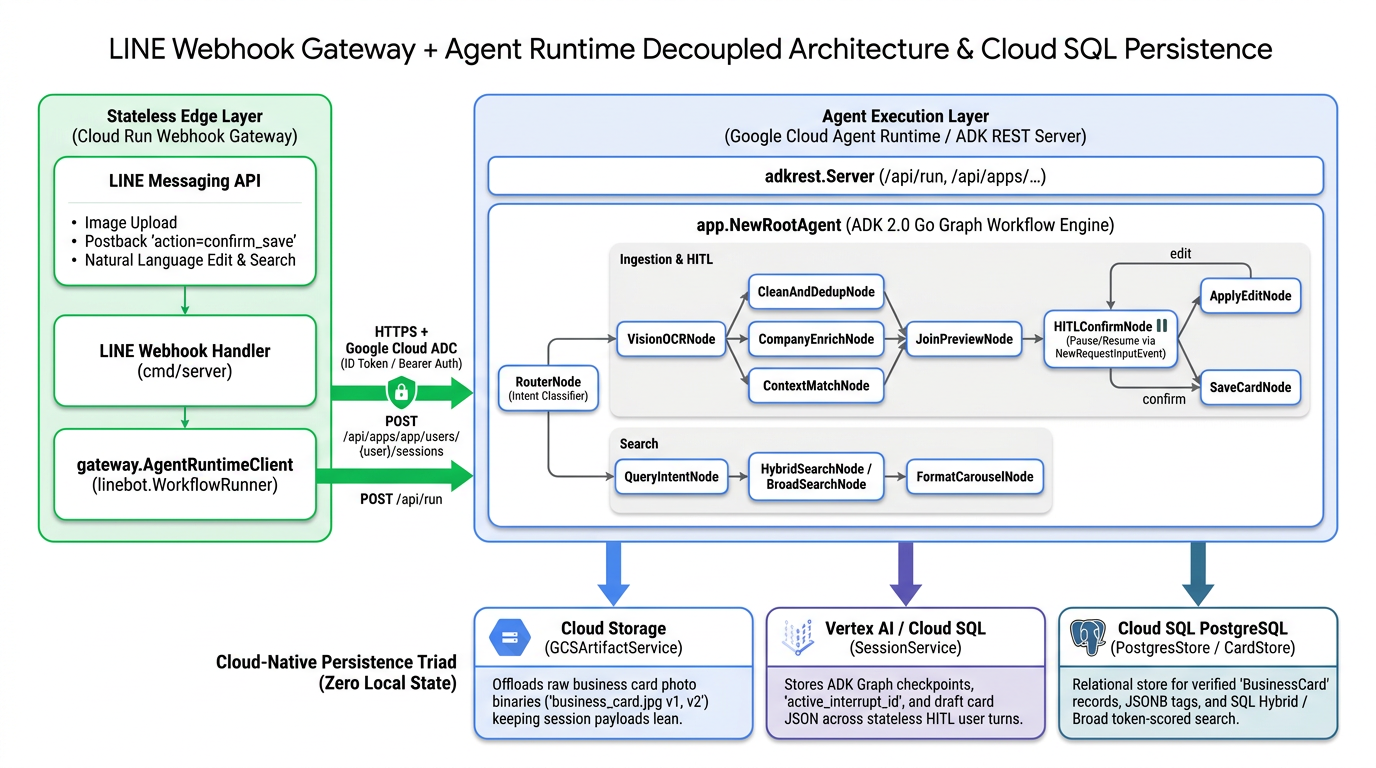
PostgresStore/ Cloud SQL):將原本存在本地記憶體或容器暫存檔的名片庫,正式升級為支援 Cloud SQL PostgreSQL 的關聯式與 JSON 混合儲存,並打通HybridSearch與 Token 計分容錯的BroadSearch。 - 雙層解耦呼叫架構(Cloud Run LINE Webhook Gateway $\rightarrow$ Agent Runtime):將負責「LINE 驗章與圖片下載」的輕量邊緣層(Edge Layer),與負責「ADK 2.0 Graph Workflow 多模態推論與搜尋」的執行層(Execution Layer)徹底解耦!
一、為什麼我們需要「雲端持久化鐵三角」與「雙層解耦架構」?
當我們把 line-card-assistant 部署到 Google Cloud 生產環境時,如果仔細檢視系統裡的每一份資料與每一個元件的職責,會發現還有兩個關鍵問題必須解決:
1. 最後一個殘留的「本地狀態」:CardStore 名片資料庫
在上一篇(PR #11)中,我們已經把 「原始名片照片」 放到 Google Cloud Storage (GCSArtifactService),並把 「工作流執行狀態與 HITL 斷點」 放到 Vertex AI / Cloud SQL (SessionService)。
但當使用者在 LINE 按下「✅ 確認存檔」走到 SaveCardNode 時,最終確認好的名片資料(models.BusinessCard)如果還是寫在單機記憶體 MemoryStore 或容器內的本地 SQLite 檔案:
- 容器重啟或 Scale-to-Zero 就清空:一旦 Agent Runtime 實例縮容至 0,辛苦建立的人脈名片庫就會瞬間蒸發。
- 多實例無法共享搜尋結果:當使用者在實例 A 存了一張名片,下一秒搜尋請求被路由到實例 B,
HybridSearchNode在實例 B 的記憶體裡根本找不到剛剛存的那張名片!
因此,我們必須補齊 「雲端無狀態持久化鐵三角(Cloud-Native Persistence Triad)」 的最後一角 —— Cloud SQL PostgreSQL (PostgresStore):
| 持久化維度 | 負責儲存的內容 | 雲端後端服務 | ADK / Go 實作套件 |
|---|---|---|---|
| 1. 二進位大檔 (Artifacts) | 原始名片照片 (business_card.jpg v1, v2…) |
Google Cloud Storage (GCS) | sessions.NewArtifactService (artifact/gcsartifact) |
| 2. 對話與圖斷點 (Sessions) | Graph Checkpoints、active_interrupt_id、draft_card |
Vertex AI Agent Engine / Cloud SQL | sessions.NewService (session/vertexai, session/database) |
| 3. 結構化業務資料 (Domain DB) | 已驗證的 BusinessCard 正式紀錄、JSON 產業標籤、混合檢索 |
Cloud SQL for PostgreSQL | store.NewStore (internal/store/postgres.go) |
2. 為什麼要把 LINE Webhook Gateway 與 Agent Runtime 拆成雙層架構?
在單體(All-in-One)模式下,cmd/server 在同一個處理序裡同時接收 LINE Webhook、跑 Vision OCR、又跑三個平行 Grounding 搜尋節點。但在企業級 Google Cloud Agent Platform 架構中,將系統拆分為 「Cloud Run LINE Webhook Gateway(邊緣層)」 與 「Google Cloud Agent Runtime(Agent 執行層)」 有三大優勢:
- 公開 Webhook 驗章與內部 IAM 權限隔離:
- LINE Messaging API 需要一個公開的 HTTPS Endpoint (
POST /webhook) 來推送事件,並使用LINE_CHANNEL_SECRET驗證X-Line-Signature簽章,且必須在 1~2 秒內立即回傳200 OK。 - 而真正的 Agent Runtime 只需要透過 Google Cloud IAM / Application Default Credentials (ADC) 對內授權,完全不需要暴露在無驗證的公網流量下,也不必持有 LINE Channel Secret。
- LINE Messaging API 需要一個公開的 HTTPS Endpoint (
- 多通道共用同一個有狀態(Session-backed)的遠端 Agent:
- 解耦之後,無論使用者是從 LINE Bot 傳名片照片、從企業內部的 Gemini Enterprise (A2A) 查詢人脈,還是開發者從 ADK WebUI 測試,背後呼叫的都是同一個託管在 Agent Runtime 上的
app.NewRootAgent!
- 解耦之後,無論使用者是從 LINE Bot 傳名片照片、從企業內部的 Gemini Enterprise (A2A) 查詢人脈,還是開發者從 ADK WebUI 測試,背後呼叫的都是同一個託管在 Agent Runtime 上的
- 極致的彈性部署(All-in-One vs. Decoupled 一鍵切換):
- 本機開發或小型專案時,不設定
AGENT_RUNTIME_URL,cmd/server就自動以 All-in-One 單體模式 執行; - 到了生產環境,只要在 Cloud Run 設定
AGENT_RUNTIME_URL=https://...,cmd/server就自動切換為 輕量無狀態的 LINE Webhook Gateway!
- 本機開發或小型專案時,不設定
我們用一張完整的系統循序圖來看看雙層解耦下的跨層互動:
sequenceDiagram
    autonumber
    actor User as LINE 使用者
    participant GW as Cloud Run<br/>LINE Webhook Gateway<br/>(cmd/server + gateway.Client)
    participant AR as Google Cloud Agent Runtime<br/>(adkrest.Server / app.NewRootAgent)
    participant GCS as Cloud Storage<br/>(GCSArtifactService)
    participant Sess as Vertex AI / Cloud SQL<br/>(SessionService)
    participant PG as Cloud SQL PostgreSQL<br/>(PostgresStore)

    User->>GW: 1. 傳送名片照片 (POST /webhook)
    GW-->>User: 2. 驗證 X-Line-Signature 並立即回傳 HTTP 200 OK
    GW->>GW: 3. 從 LINE Blob API 下載圖片 []byte
    GW->>AR: 4. POST /api/apps/app/users/{user}/sessions/{id}<br/>+ POST /api/run (附帶 Google Cloud ADC ID Token 與圖片 InlineData)
    AR->>GCS: 5. RouterNode 自動將圖片轉存至 GCS Artifact ("business_card.jpg" v1)
    AR->>AR: 6. VisionOCRNode -> AddFanOut (查重 / GoogleSearch 公司背景 / 對話場合) -> BuildPreviewNode
    AR->>Sess: 7. HITLConfirmNode 觸發 NewRequestInputEvent<br/>持久化 active_interrupt_id="hitl_confirm_1"
    AR-->>GW: 8. 回傳 Events 與 Session State (含 flex_preview_json)
    GW-->>User: 9. 推播 LINE Flex Message 名片預覽卡 (⏸️ 等待使用者確認)

    Note over GW,AR: ☁️ Gateway 完全無狀態,下一次請求可落在任意 Gateway 實例

    User->>GW: 10. 輸入修改:「職稱改為技術長」或點擊「✅ 確認存檔」
    GW->>AR: 11. HasPendingHITL -> GET /api/apps/app/users/{user}/sessions<br/>自動找回遠端暫停中的 {SessionID, active_interrupt_id}
    GW->>AR: 12. POST /api/run (傳送 adk_request_input FunctionResponse)
    AR->>PG: 13. 若為確認存檔:SaveCardNode 呼叫 PostgresStore.Save() Upsert 寫入 Cloud SQL
    AR->>Sess: 14. 清空 active_interrupt_id="" 並記錄 saved_card_id
    AR-->>GW: 15. 回傳存檔成功與 AI 破冰跟進信草稿
    GW-->>User: 16. 推播存檔確認與破冰信給使用者!
二、實戰拆解 (1):打造 Cloud SQL PostgreSQL 名片庫 (internal/store/postgres.go) — Issue #5
在我們的專案中,因為先前 sessions/sessions.go 為了支援 SESSION_TYPE=cloud_sql 已經引入了 gorm.io/gorm 與 gorm.io/driver/postgres,我們完全不需要額外膨脹依賴樹,就能直接用 GORM 為 CardStore 打造生產級的 PostgresStore!
1. 擴充 store.CardStore 介面:讓所有後端原生支援 BroadSearch
在檢查原有的 internal/workflow/nodes_search.go 時,我們發現原本 BroadSearchNode 裡有一段針對 *store.MemoryStore 的型別斷言(Type Assertion):
// ❌ 舊版寫法:只有 MemoryStore 支援 BroadSearch,其他 Store 只好退回 ListByUser
if memStore, ok := cardStore.(*store.MemoryStore); ok {
    cards, err = memStore.BroadSearch(ctx, userID, keywords)
} else {
    cards, err = cardStore.ListByUser(ctx, userID)
}
為了讓 PostgresStore 與 MemoryStore 享有完全一致的混合檢索與模糊降級體驗,我們在 internal/store/store.go 中正式將 BroadSearch 納入 CardStore 標準介面:
// CardStore defines the persistence and search interface for business cards.
type CardStore interface {
	Save(ctx context.Context, card *models.BusinessCard) error
	GetByID(ctx context.Context, id string) (*models.BusinessCard, error)
	CheckDuplicate(ctx context.Context, userID, name, company, email string) (*models.BusinessCard, bool, error)
	HybridSearch(ctx context.Context, filter models.SearchFilter) ([]*models.BusinessCard, error)
	BroadSearch(ctx context.Context, userID string, keywords []string) ([]*models.BusinessCard, error)
	ListByUser(ctx context.Context, userID string) ([]*models.BusinessCard, error)
}
如此一來,BroadSearchNode 只需要乾淨俐落地呼叫一行 cardStore.BroadSearch(ctx, userID, keywords) 即可!
2. 設計 GORM Schema 與 Upsert 機制 (BusinessCardRecord)
在 internal/store/postgres.go 中,我們定義了對應 PostgreSQL business_cards 資料表的 BusinessCardRecord,針對常用查詢欄位(user_id, name, company, email, met_date, updated_at)加上索引,並將 Tags []string 序列化為 JSON 字串儲存於 tags_json:
// BusinessCardRecord is the GORM database model for persisting a models.BusinessCard
// in PostgreSQL / Cloud SQL.
type BusinessCardRecord struct {
	ID             string    `gorm:"primaryKey;size:128"`
	UserID         string    `gorm:"index;size:128;not null"`
	Name           string    `gorm:"index;size:255"`
	Title          string    `gorm:"size:255"`
	Company        string    `gorm:"index;size:255"`
	Email          string    `gorm:"index;size:255"`
	Phone          string    `gorm:"size:64"`
	Address        string    `gorm:"type:text"`
	TaxID          string    `gorm:"size:32"`
	Website        string    `gorm:"size:512"`
	RawOCR         string    `gorm:"type:text"`
	CompanySummary string    `gorm:"type:text"`
	CompanyInfo    string    `gorm:"type:text"`
	TagsJSON       string    `gorm:"column:tags_json;type:text"`
	MetContext     string    `gorm:"type:text"`
	RawImageURL    string    `gorm:"type:text"`
	MetDate        time.Time `gorm:"index"`
	CreatedAt      time.Time `gorm:"index"`
	UpdatedAt      time.Time `gorm:"index"`
}
當使用者拍到一張已經存在的人脈名片(例如對方從「資深工程師」升遷為「技術副總」,經由 CleanAndDedupNode 識別出重複並複用原本的 card.ID),PostgresStore.Save 會透過 PostgreSQL 原生的 ON CONFLICT (id) DO UPDATE (clause.OnConflict{UpdateAll: true}) 完成原子級 Upsert:
if err := s.db.WithContext(ctx).Clauses(clause.OnConflict{
	Columns:   []clause.Column,
	UpdateAll: true,
}).Create(rec).Error; err != nil {
	return fmt.Errorf("upsert business card %q: %w", cp.ID, err)
}
3. 自動感知 Cloud SQL Unix Socket 與環境變數的 store.NewStore(ctx) 工廠
在 Cloud Run 或 Agent Runtime 連接 Cloud SQL 時,官方推薦透過 Cloud SQL Auth Proxy 建立的 Unix Domain Socket (/cloudsql/<PROJECT>:<REGION>:<INSTANCE>) 連線;而在本機或 GKE 則常使用 DATABASE_URL 或 DB_HOST。
我們在 BuildPostgresDSNFromEnv() 與 store.NewStore(ctx) 中同時支援這三種模式,且在未設定資料庫環境變數時自動無縫降級回預載 4 張台灣範例名片的 MemoryStore:
// BuildPostgresDSNFromEnv resolves a PostgreSQL / Cloud SQL connection string from environment variables.
// Priority:
//  1. CARD_STORE_DSN / DATABASE_URL / POSTGRES_DSN
//  2. Cloud SQL Unix socket when INSTANCE_CONNECTION_NAME + DB_PASS are set
//  3. Standard TCP host when DB_HOST + DB_PASS are set
func BuildPostgresDSNFromEnv() string {
	for _, key := range []string{"CARD_STORE_DSN", "DATABASE_URL", "POSTGRES_DSN"} {
		if v := strings.TrimSpace(os.Getenv(key)); v != "" {
			return v
		}
	}

	dbUser := envOrDefault("DB_USER", "postgres")
	dbName := envOrDefault("DB_NAME", "postgres")
	dbPass := strings.TrimSpace(os.Getenv("DB_PASS"))
	instanceConn := strings.TrimSpace(os.Getenv("INSTANCE_CONNECTION_NAME"))
	if instanceConn != "" && dbPass != "" {
		return fmt.Sprintf(
			"host=/cloudsql/%s user=%s password=%s dbname=%s sslmode=disable",
			instanceConn, dbUser, dbPass, dbName,
		)
	}
    // ...
}
如此一來,只要你的環境裡已經為了 SESSION_TYPE=cloud_sql 設定好 INSTANCE_CONNECTION_NAME 與 DB_PASS,SessionService 與 CardStore 就能直接共用同一個 Cloud SQL PostgreSQL 實例,連一毛錢的額外資料庫成本都不必多花!
三、實戰拆解 (2):打造無狀態 LINE Webhook Gateway 與遠端 AgentRuntimeClient (internal/gateway/client.go) — Issue #6
接下來是 Phase 3 最核心的工程:如何讓 cmd/server 的 LINE Bot Webhook Handler 不必在本地跑 workflow.Engine,而是透過 HTTP 將所有名片辨識、HITL 恢復、搜尋與破冰信請求轉發給遠端的 Agent Runtime?
還記得我們在第一版設計 internal/linebot/handler.go 時,就已經先見之明地把 Webhook Handler 與 Workflow Engine 之間隔了一層 linebot.WorkflowRunner 介面 嗎?
// internal/linebot/handler.go
type WorkflowRunner interface {
	HasPendingHITL(userID string) bool
	RecordUserMessage(userID, text string)
	StartIngest(ctx context.Context, userID string, imageBytes []byte, recentMessages []string) (*WorkflowResponse, error)
	ResumeHITL(ctx context.Context, userID string, userReply string) (*WorkflowResponse, error)
	RunSearch(ctx context.Context, userID string, query string) (*WorkflowResponse, error)
	RunEmailDraft(ctx context.Context, userID string, cardID string) (*WorkflowResponse, error)
}
正因為有這個乾淨的介面,我們的 linebot.Handler 一行程式碼都不用改!我們只需要在 internal/gateway/client.go 中實作一個滿足 linebot.WorkflowRunner 介面的 gateway.Client!
1. 支援 Google Cloud ADC 自動簽發 Token 的 gateway.NewClient
當 Cloud Run 上的 LINE Webhook Gateway 要呼叫受 IAM 保護的遠端 Agent Runtime(或另一座內部 Cloud Run 上的 ADK REST Server)時,gateway.NewClient 會自動透過 google.golang.org/api/idtoken(或 golang.org/x/oauth2/google)取得目前 Service Account 的 Google Cloud ADC 憑證,並自動附加在每個 HTTP 請求的 Authorization: Bearer <token> Header 中:
func NewClient(ctx context.Context, baseURL string, useADC bool, opts ...ClientOption) (*Client, error) {
	trimmed := strings.TrimRight(strings.TrimSpace(baseURL), "/")
	if trimmed == "" {
		return nil, fmt.Errorf("agent runtime baseURL cannot be empty")
	}
	if !strings.HasSuffix(trimmed, "/api") {
		trimmed += "/api"
	}

	hc := &http.Client{Timeout: 60 * time.Second}
	if useADC {
		if idClient, err := idtoken.NewClient(ctx, strings.TrimSuffix(trimmed, "/api")); err == nil {
			hc = idClient
		} else if oauthClient, err := google.DefaultClient(ctx, "https://www.googleapis.com/auth/cloud-platform"); err == nil {
			hc = oauthClient
		}
	}
    // ...
}
2. 跨層轉發名片圖片:Gateway 下載圖片 $\rightarrow$ Agent Runtime 自動寫入 GCS Artifact
當使用者在 LINE 上傳一張名片照片時:
- Gateway 從 LINE Blob API 下載圖片
imageBytes。 gateway.Client.StartIngest先呼叫遠端 ADK REST API 的POST /api/apps/{appName}/users/{userID}/sessions/{sessionID}建立工作階段。- 接著呼叫
POST /api/run,將imageBytes包裝在newMessage.Parts的InlineData中送給遠端 Agent Runtime:
func (c *Client) StartIngest(ctx context.Context, userID string, imageBytes []byte, recentMessages []string) (*linebot.WorkflowResponse, error) {
	sessionID := "ingest-" + uuid.NewString()
	initialState := map[string]any{
		workflow.StateKeyInputType:      workflow.RouteIngest,
		workflow.StateKeyUserID:         userID,
		workflow.StateKeyRecentMessages: recentMessages,
	}
	if err := c.createSession(ctx, userID, sessionID, initialState); err != nil {
		return nil, err
	}

	parts := []*genai.Part{
		{Text: workflow.RouteIngest},
	}
	if len(imageBytes) > 0 {
		parts = append(parts, &genai.Part{
			InlineData: &genai.Blob{
				MIMEType: "image/jpeg",
				Data:     imageBytes,
			},
		})
	}
	msg := &genai.Content{
		Role:  genai.RoleUser,
		Parts: parts,
	}

	res, err := c.runTurn(ctx, userID, sessionID, msg, initialState)
    // ...
}
這時我們在上一篇(Phase 2)在 RouterNode 寫好的邏輯就發揮了神效:當遠端 Agent Runtime 的 RouterNode 收到這個帶有 InlineData 的請求時,它會自動呼叫 ctx.Artifacts().Save(ctx, "business_card.jpg", ...) 把圖片存進 GCS Artifact Bucket,並在 Session.State 裡只留下輕量的 card_image_artifact 與 card_image_version!
這意味著 LINE Webhook Gateway 甚至不需要直接掛載 GCS Bucket 的寫入權限,就能讓遠端 Agent Runtime 完成 GCS Artifact 的版本化歸檔!
3. 跨層級的無狀態 HITL 斷點探索與恢復 (resolvePendingHITL + ResumeHITL)
最精彩的部分在於:當使用者看到 LINE Flex 預覽卡,過了 5 分鐘輸入「職稱改為技術長」,而這筆 Webhook 請求落在了另一台全新的 Cloud Run Gateway 實例上時,gateway.Client 怎麼知道這個使用者在遠端 Agent Runtime 有一個正在等待確認的 HITL Session?
我們在 gateway.Client.resolvePendingHITL 中透過 ADK REST API 的 GET /api/apps/{appName}/users/{userID}/sessions 端點,直接向遠端 Agent Runtime 查詢該使用者的工作階段狀態,並檢視 state["active_interrupt_id"]:
func (c *Client) resolvePendingHITL(ctx context.Context, userID string) (pendingHITL, bool) {
	// 1. 若本地快取已有 SessionID,直接向遠端 GET /sessions/{id} 取得最新的 active_interrupt_id
	//    (重要!因為每次進入 Edit 迴圈後,hitl_seq 會遞增為 hitl_confirm_2、hitl_confirm_3...)
	c.mu.RLock()
	cached, hasCached := c.pendingSession[userID]
	c.mu.RUnlock()
	if hasCached && cached.SessionID != "" {
		if fullSess, err := c.getSession(ctx, userID, cached.SessionID); err == nil && fullSess != nil {
			if activeID := readStringFromMap(fullSess.State, workflow.StateKeyActiveInterruptID); activeID != "" {
				found := pendingHITL{SessionID: cached.SessionID, InterruptID: activeID}
				c.mu.Lock()
				c.pendingSession[userID] = found
				c.mu.Unlock()
				return found, true
			}
		}
	}

	// 2. 若這是一台全新的無狀態 Gateway 實例,呼叫遠端 GET /sessions 找出帶有 active_interrupt_id 的工作階段
	sessions, err := c.listSessions(ctx, userID)
	if err != nil {
		return pendingHITL{}, false
	}
	for _, sess := range sessions {
		activeID := readStringFromMap(sess.State, workflow.StateKeyActiveInterruptID)
		if activeID == "" && sess.ID != "" {
			if fullSess, err := c.getSession(ctx, userID, sess.ID); err == nil && fullSess != nil {
				activeID = readStringFromMap(fullSess.State, workflow.StateKeyActiveInterruptID)
			}
		}
		if activeID != "" {
			found := pendingHITL{SessionID: sess.ID, InterruptID: activeID}
			c.mu.Lock()
			c.pendingSession[userID] = found
			c.mu.Unlock()
			return found, true
		}
	}
	return pendingHITL{}, false
}
這裡有一個我們在撰寫整合測試時抓到的真實 Bug 與關鍵細節:
- 當使用者在 Turn 1 上傳名片時,
HITLConfirmNode產生的第一個斷點 ID 是hitl_confirm_1。 - 當使用者在 Turn 2(可能由 Gateway 實例 2 處理)輸入「職稱改為技術長」後,
ApplyEditNode修改完職稱並繞回HITLConfirmNode再次暫停,這時斷點 ID 會遞增為hitl_confirm_2! - 如果此時 Turn 3(使用者按下「✅ 確認存檔」)剛好又回到 Gateway 實例 1,若實例 1 盲目相信自己記憶體裡舊的快取(
hitl_confirm_1),送出的FunctionResponse就不會匹配最新的斷點hitl_confirm_2! - 因此,我們在
resolvePendingHITL中確保:即使本地快取命中了SessionID,也會透過getSession同步遠端最新的active_interrupt_id。這樣一來,無論請求在幾台 Gateway 實例之間如何來回跳躍、修改了幾次欄位,永遠都能精準對齊最新的InterruptID!
4. cmd/server/main.go:單體模式與雙層 Gateway 模式無縫切換
最後,我們在 cmd/server/main.go 中加上模式判斷:
	var runner linebot.WorkflowRunner
	if cfg.AgentRuntimeURL != "" {
		// 🌐 模式 A:雙層解耦 LINE Webhook Gateway 模式 (轉發至遠端 Agent Runtime)
		gwClient, err := gateway.NewClient(
			ctx,
			cfg.AgentRuntimeURL,
			cfg.AgentRuntimeUseADC,
			gateway.WithAppName(cfg.AgentRuntimeAppName),
		)
		if err != nil {
			slog.Error("failed to initialize remote Agent Runtime gateway client", "url", cfg.AgentRuntimeURL, "err", err)
			os.Exit(1)
		}
		slog.Info("running in decoupled LINE Webhook Gateway mode",
			"agent_runtime_url", cfg.AgentRuntimeURL,
			"agent_runtime_app", cfg.AgentRuntimeAppName,
			"use_adc", cfg.AgentRuntimeUseADC,
		)
		runner = gwClient
	} else {
		// 🚀 模式 B:All-in-One 本地 Engine 模式 (預設本機開發與單一容器部署)
		cardStore, err := store.NewStore(ctx)
        // ... 初始化本地 workflow.NewEngine ...
		runner = engine.LinebotRunner()
	}

	botHandler, err := linebot.NewHandler(cfg, runner)
四、端到端雙層架構整合測試 (internal/gateway/client_test.go)
為了確保 gateway.Client 與 ADK Go v2.6.0 官方的 server/adkrest REST 伺服器百分之百相容,我們在 internal/gateway/client_test.go 中直接用 httptest.NewServer 啟動了一台真實的 adkrest.NewServer(掛載我們的 app.NewRootAgentWithDeps),並建立兩個完全獨立的 Gateway Client(client1 與 client2)進行五階段端到端測試:
- Turn 1 (
client1.StartIngest):透過 HTTP 上傳名片照片 $\rightarrow$ 驗證遠端ArtifactService成功寫入business_card.jpg$\rightarrow$ 驗證回傳WaitingHITL=true(hitl_confirm_1)與包含「王大明」的 LINE Flex Preview JSON。 - 跨實例狀態探測 (
client2.HasPendingHITL):全新的無狀態client2透過GET /api/apps/app/users/{user}/sessions探測到client1建立的暫停工作階段。 - Turn 2 (
client2.ResumeHITL— 自然語言修改):client2發送「職稱改為技術長」$\rightarrow$ 驗證遠端執行ApplyEditNode並更新DraftCard.Title == "技術長",且再次暫停於hitl_confirm_2。 - Turn 3 (
client1.ResumeHITL— 確認存檔):切回client1發送"action=confirm_save"$\rightarrow$client1自動同步最新斷點hitl_confirm_2並喚醒SaveCardNode$\rightarrow$ 驗證名片成功寫入遠端CardStore且回傳 AI 破冰信。 - Turn 4 & Turn 5 (
client2.RunSearch&client2.RunEmailDraft):透過 HTTP 呼叫遠端混合搜尋與單獨撰寫破冰信,驗證回傳 Flex Carousel JSON 與破冰信內文。
執行完整測試套件:
$ go test -race -v ./...
=== RUN   TestGatewayClient_EndToEndDecoupledIngestHITLAndSearch
--- PASS: TestGatewayClient_EndToEndDecoupledIngestHITLAndSearch (0.01s)
=== RUN   TestBusinessCardRecordRoundTrip
--- PASS: TestBusinessCardRecordRoundTrip (0.00s)
=== RUN   TestBuildPostgresDSNFromEnv
--- PASS: TestBuildPostgresDSNFromEnv (0.00s)
=== RUN   TestNewStoreFactoryFallback
--- PASS: TestNewStoreFactoryFallback (0.00s)
=== RUN   TestRankCardsByKeywords
--- PASS: TestRankCardsByKeywords (0.00s)
PASS
所有單元測試與跨層整合測試在開啟 -race 競爭檢測下全數綠燈通過!
五、總結與 Roadmap 進度盤點
完成 PR #12 後,我們回頭看 Roadmap Issue #9 的五大階段,目前 Phase 1、Phase 2 與 Phase 3 已經 100% 全部完成!
- Phase 1 (
agents-cli&adk_goScaffolding):完成 Issue #1、#2(PR #10) - Phase 2 (Agent Runtime 適配與雲端持久化鐵三角):完成 Issue #3、#4(PR #11)與 Issue #5(PR #12)
- Phase 3 (LINE Webhook Gateway 與 Agent Runtime 雙層解耦架構):完成 Issue #6(PR #12)
- Phase 4 (
agents-cli eval自動化評估與基準測試):Issue #7 - Phase 5 (Agent Runtime 正式部署、Terraform IaC 與 Cloud Trace 可觀測性):Issue #8
在接下來的系列文章中,我們將進入 Phase 4 與 Phase 5,使用 agents-cli eval 為這套 12 節點 Graph Workflow 建立自動化品質評估飛輪(Quality Flywheel),並透過 agents-cli deploy 與 OpenTelemetry 將整套系統正式部署上線,敬請期待!
參考資源與延伸閱讀
- 《Agent Platform 實戰》系列文章:
- [Agent Platform 實戰 (1)] 用 Go 與 Google ADK 2.0 Graph Workflow 打造 LINE AI 名片王:從 Fan-Out 平行檢索到 HITL 暫停迴圈修正
- [Agent Platform 實戰 (2)] 從單體 Cloud Run 邁向 Google Cloud Agent Runtime:用 agents-cli 與 ADK Go 重構 LINE AI 名片王
- [Agent Platform 實戰 (3)] 破解無狀態容器的 HITL 失憶症:用 ADK 2.0 GCS Artifact Service 與 Agent Platform Sessions 實現跨實例名片辨識與暫停恢復
- 本專案開源程式碼與 PR:
- GitHub Repository:kkdai/line-card-assistant
- Phase 2 & 3 實作 Pull Request:PR #12: feat(phase2-3): Cloud SQL PostgresStore (#5) & Decoupled LINE Webhook Gateway (#6)
- 已完成 Issues:Issue #5、Issue #6、Roadmap #9
- Google ADK 與 Agent Platform 官方文件:
- ADK (5) ,
- ADK 2.0 (4) ,
- Agent Platform (4) ,
- Agent Runtime (3) ,
- Cloud Run (17) ,
- Cloud SQL (1) ,
- PostgreSQL (1) ,
- Graph Workflow (4) ,
- Golang (73) ,
- LINEBot (33)

